
Profile — Integrations ▸ Add-ins
The Profile ▸ Integrations ▸ Add-ins page is the user-facing pairing surface for the Matter Planner Outlook and Gmail add-ins. The add-ins read your inbox and let you link individual emails to a Matter without leaving your mail client.
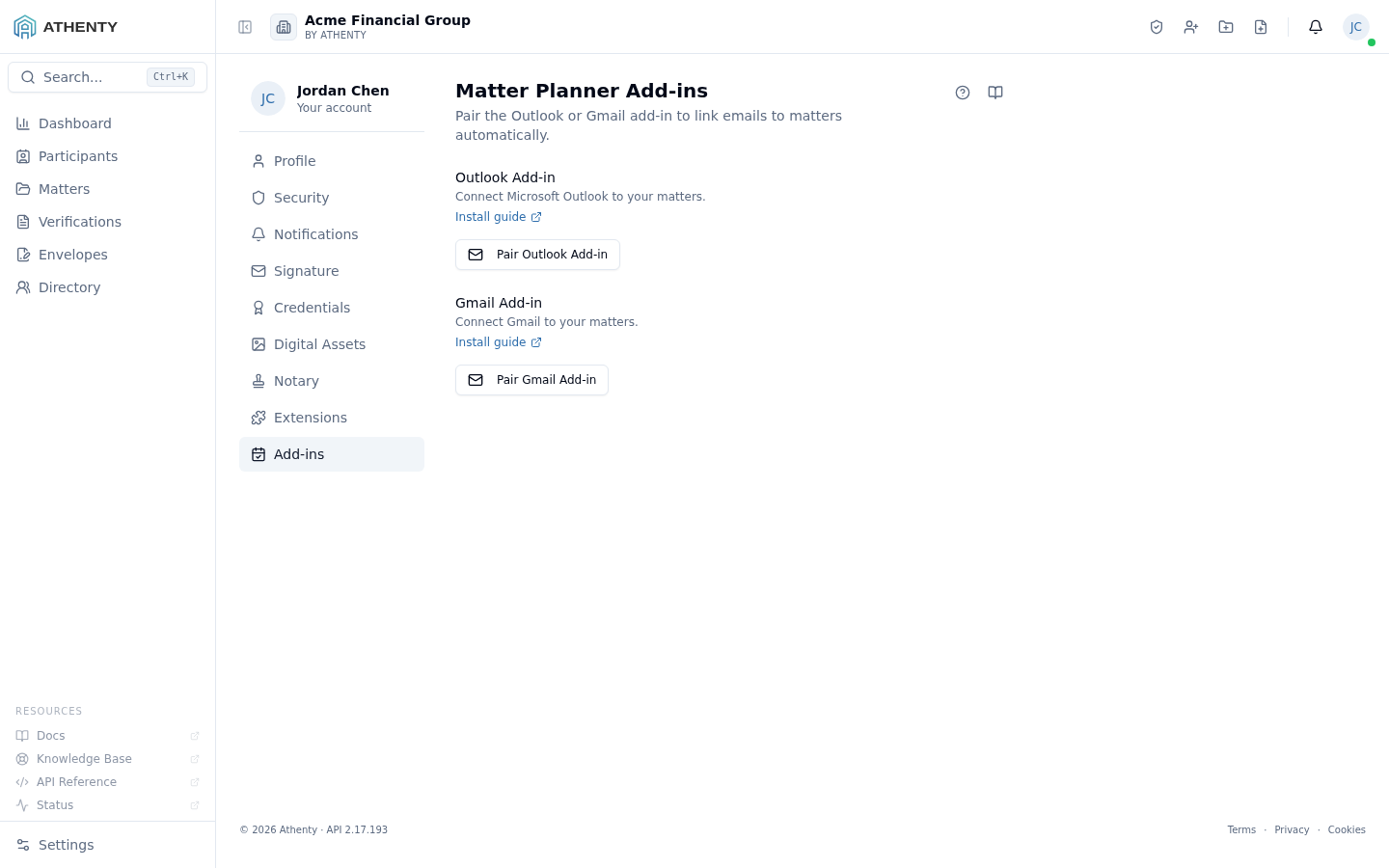
Anatomy of the page
Section titled “Anatomy of the page”1. Page header
Section titled “1. Page header”Standard PageHeader with the title Matter Planner Add-ins and a one-line description.
2. Two pairing sections
Section titled “2. Two pairing sections”Each channel has its own section with identical mechanics:
- A short description and Install guide link to the relevant store
setup walkthrough on
athenty.com - A Pair button that emits a 6-digit code on click
- A countdown card while the code is live
- A Paired list of mailboxes successfully bound to this user
The two channels (Outlook and Gmail) are fully independent — pair, code, and revoke flows do not cross.
3. Pairing card
Section titled “3. Pairing card”Identical to the Extensions page: 6 fixed-width digits, a 5-minute countdown bar, and an expired state. Codes are single-use and bound to the user’s session.
4. Paired list
Section titled “4. Paired list”Below each section’s Pair button, a list of currently paired mailboxes with the same data shape used on the Extensions page:
- Auto-derived display name (mailbox + client identification)
- Who paired it (you)
- Last-used timestamp
- Expired pill if the inactivity window has lapsed
- Per-row revoke button
Why two pairings?
Section titled “Why two pairings?”A user can read mail in both Outlook and Gmail (work + personal, for instance), and each client has its own add-in store. Pairing each independently means:
- Revoking one channel doesn’t affect the other
- Org admins can disable one channel without breaking the other
- The audit trail clearly attributes which channel an action came from
Code semantics (same as Extensions)
Section titled “Code semantics (same as Extensions)”- Length: 6 digits
- TTL: 300 seconds (5 minutes)
- Single-use: consumed on first valid submission
- Auto-expired: replaced if the user clicks Pair again while one is live
The shared extension_tokens table records each pairing’s channel
(outlook, gmail, or snap), which is what powers the per-section
filtering on this page.
Pairing lifecycle
Section titled “Pairing lifecycle”created ─▶ active ─▶ revoked ↘ expired (after inactivity window)Same as Extensions — the inactivity window defaults to 90 days and is configurable per-tenant under Settings ▸ Compliance.
Permissions and scope
Section titled “Permissions and scope”| Role | Pair | Revoke own | Revoke others |
|---|---|---|---|
| Owner / Admin | ✓ | ✓ | ✓ (via Settings ▸ Compliance) |
| Member | ✓ | ✓ | ✗ |
| Viewer | ✗ | ✗ | ✗ |
Pairings are user-scoped — admins see only their own on this page.
Audit trail
Section titled “Audit trail”Each pairing emits the same extension.* events as the browser
extension, with channel discriminated:
extension.code_generated(channel: outlook | gmail | snap)extension.pairedextension.revokedextension.expired
Events surface in Settings ▸ Audit Log for admins and in Profile ▸ Security ▸ Activity for the user.
Troubleshooting
Section titled “Troubleshooting”| Symptom | Most likely cause | Fix |
|---|---|---|
| Code rejected | Expired before submission | Click Pair again for a fresh code |
| Pairing missing from list | Network race after add-in submitted | Refresh the page |
| Both channels fail with same code | Code was scoped to the wrong channel during paste | Generate per channel; paste fast |
| Add-in stops working after pair | User signed out of Athenty | Sign back in; pairings persist |
| Inactivity-expired pairing | No add-in activity in 90 days | Re-pair to refresh |
Related pages
Section titled “Related pages”- Profile ▸ Integrations ▸ Extensions — Athenty Snap browser extension pairing
- Profile ▸ General — your activity feed shows pairing events
- Outlook add-in getting started
- Gmail add-in getting started
- Settings ▸ Compliance — admin-side pairing policy