
Settings — Access Levels
The Settings ▸ Access Levels page is where admins control the platform’s role + permission model for their tenant. Two sections: a reference card that documents what each role can do, and a team list with per-user role + HR-add-on controls.
Owner-only actions are also gated server-side, so any change here respects the same permission rules as the rest of the platform — admins cannot self-promote past their permissions, and last-Owner demotion is blocked.
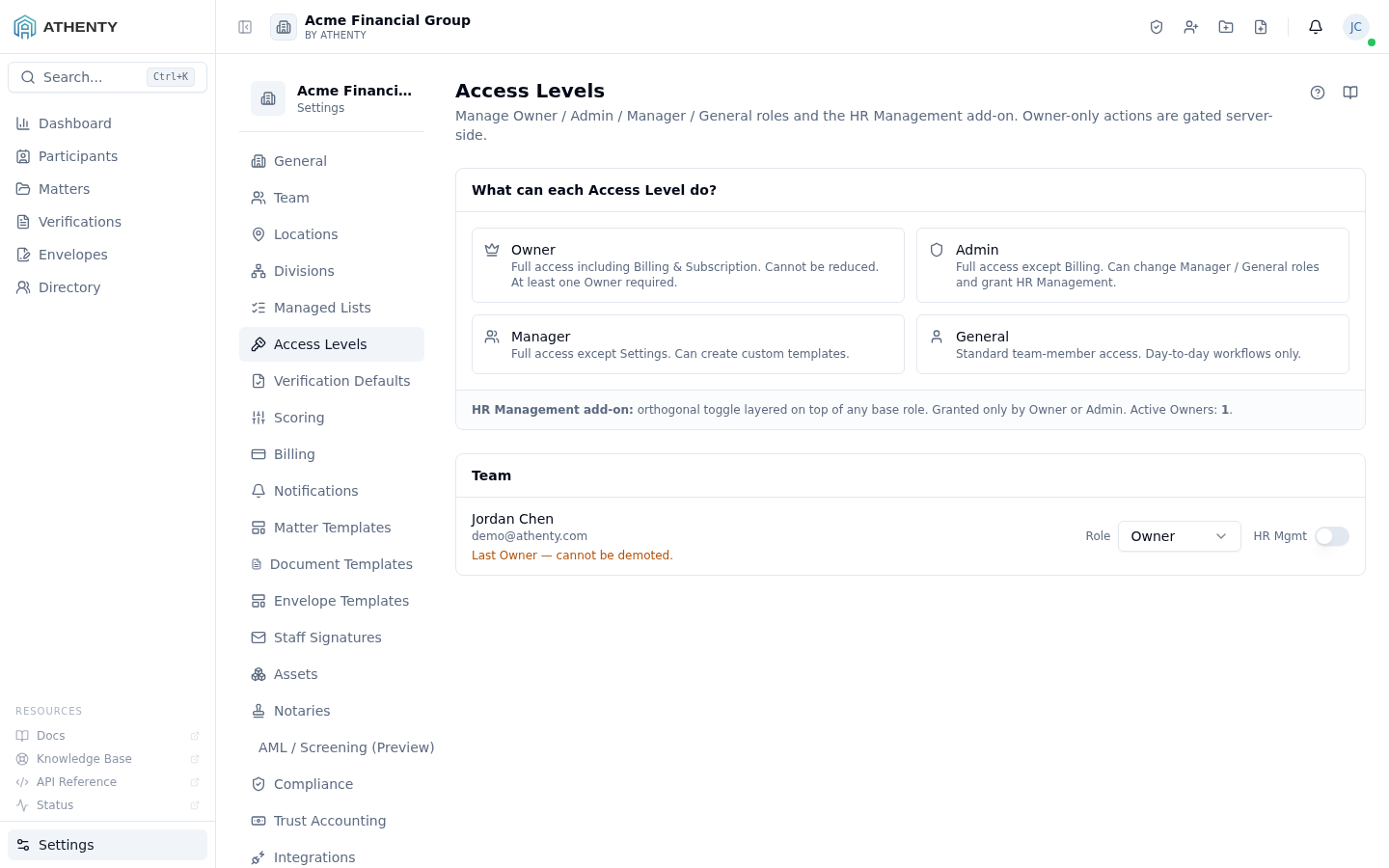
Anatomy of the page
Section titled “Anatomy of the page”1. Page header
Section titled “1. Page header”PageHeader with the title Access Levels and a one-line description.
2. Permission reference card
Section titled “2. Permission reference card”Section header “What can each Access Level do?” followed by a 2-column grid with one card per role:
- Role icon + name
- Capability list (checkmarks for what the role can do)
- Capability list (red x for what the role cannot)
The card is informational only — it documents the platform’s seeded permission catalogue. Per-action overrides (when needed) are configured server-side.
3. Team list
Section titled “3. Team list”Section header “Team” followed by a per-user row:
- Avatar + display name + email
- Role dropdown — current role, with disable rules for lockout protection
- HR add-on toggle — only on Manager / General users
Changes save inline; no batch-save button.
The role model
Section titled “The role model”Athenty’s role model is fixed in code. The four roles ship with documented default capabilities:
| Role | Capabilities |
|---|---|
| Owner | Full platform + billing + dangerous deletions |
| Admin | Settings + team management; no billing |
| Manager | Matter-responsible work; team management within reporting line |
| General | Day-to-day verifications and envelopes |
The reference card on this page is generated from the same permission catalogue that gates server-side authorization, so it stays in sync with the actual enforcement.
HR Management add-on
Section titled “HR Management add-on”A boolean per-user flag that grants HR access (employment data, compensation, health, IDV review under Settings ▸ Team) without elevating to Admin. Use cases:
- HR specialists who need people-data but not platform-admin powers
- Office managers who handle onboarding/offboarding records
- Compliance staff who track credentials + IDV status
Add-on toggle behaviour:
- Visible only on Manager + General users
- Settable by any Owner / Admin
- Persists independently of the role; promoting later doesn’t toggle it
- Audit-logged separately as
user.hr_role_granted/_revoked
Lockout protections
Section titled “Lockout protections”The platform refuses two transitions to prevent admin lockout:
| Refused transition | Why |
|---|---|
| Demote yourself from Owner | Prevents accidental self-lockout |
| Demote the last Owner (any actor) | Tenant must have ≥ 1 Owner |
To rotate ownership, promote a new Owner first, then demote the old one.
Changing access resets remembered devices
Section titled “Changing access resets remembered devices”Any change to a team member’s access — their access level, any additional-access toggle (HR / Bookkeeping / Compliance Management), or their Trust Transfer Approver designation — signs out every device that member had asked us to remember for two-factor sign-in.
That has always been the behaviour: a “remember this device” grant is issued against the privileges the person held at the time, so it must not survive a change to those privileges. What the grant surfaces now tell you is that it is happening:
- The person making the change sees a standing note above the controls, and the confirmation names how many remembered devices were signed out — shown only when devices were actually signed out.
- The affected team member gets a notification in their bell saying their remembered devices were signed out and that their next sign-in will ask for their two-factor code.
Nobody is signed out of their current session, and no password is affected — only the two-factor “remember this device” shortcut. The member can remember the device again the next time they sign in. Their remembered devices are listed under Profile ▸ Security ▸ Sessions.
Permissions and scope
Section titled “Permissions and scope”| Role | View | Set roles | Toggle HR | Demote Owner |
|---|---|---|---|---|
| Owner | ✓ | ✓ (any → any) | ✓ | ✓ (not last) |
| Admin | ✓ | ✓ (not Owner) | ✓ | ✗ |
| Manager | ✗ | ✗ | ✗ | ✗ |
| General | ✗ | ✗ | ✗ | ✗ |
| Viewer | ✗ | ✗ | ✗ | ✗ |
/settings/access-levels is admin-only via RoleGuard.
Audit logging
Section titled “Audit logging”| Action | Event |
|---|---|
| Role change | user.role_updated (with old + new role) |
| HR grant | user.hr_role_granted |
| HR revoke | user.hr_role_revoked |
Events surface in Settings ▸ Audit Log.
Troubleshooting
Section titled “Troubleshooting”| Symptom | Most likely cause | Fix |
|---|---|---|
| Cannot demote | Target is last Owner | Promote another Owner first |
| Owner role disabled in dropdown | Acting role is Admin | Have an Owner make the change |
| HR toggle missing | Target is Owner / Admin | They already have HR via role |
| Role change not applying | User session cached | User signs out + back in |
| Capability missing on the reference | Plan tier exclusion | Verify in Settings ▸ Billing |
Related pages
Section titled “Related pages”- Settings ▸ Team — primary team-management surface
- Settings ▸ Audit Log —
user.role_updatedanduser.hr_*events - Settings ▸ Billing — plan tier gates some role capabilities