
Settings — Verification Defaults
The Settings ▸ Verification Defaults page controls what’s pre-selected when team members open the New Verification wizard. Set good defaults once and save clicks across every verification your team creates.
The page is admin-only. The user-side effect lives on the New Verification wizard’s Type and Steps steps — pre-selected template, pre-checked steps, and the subject-facing flow order all come from here.
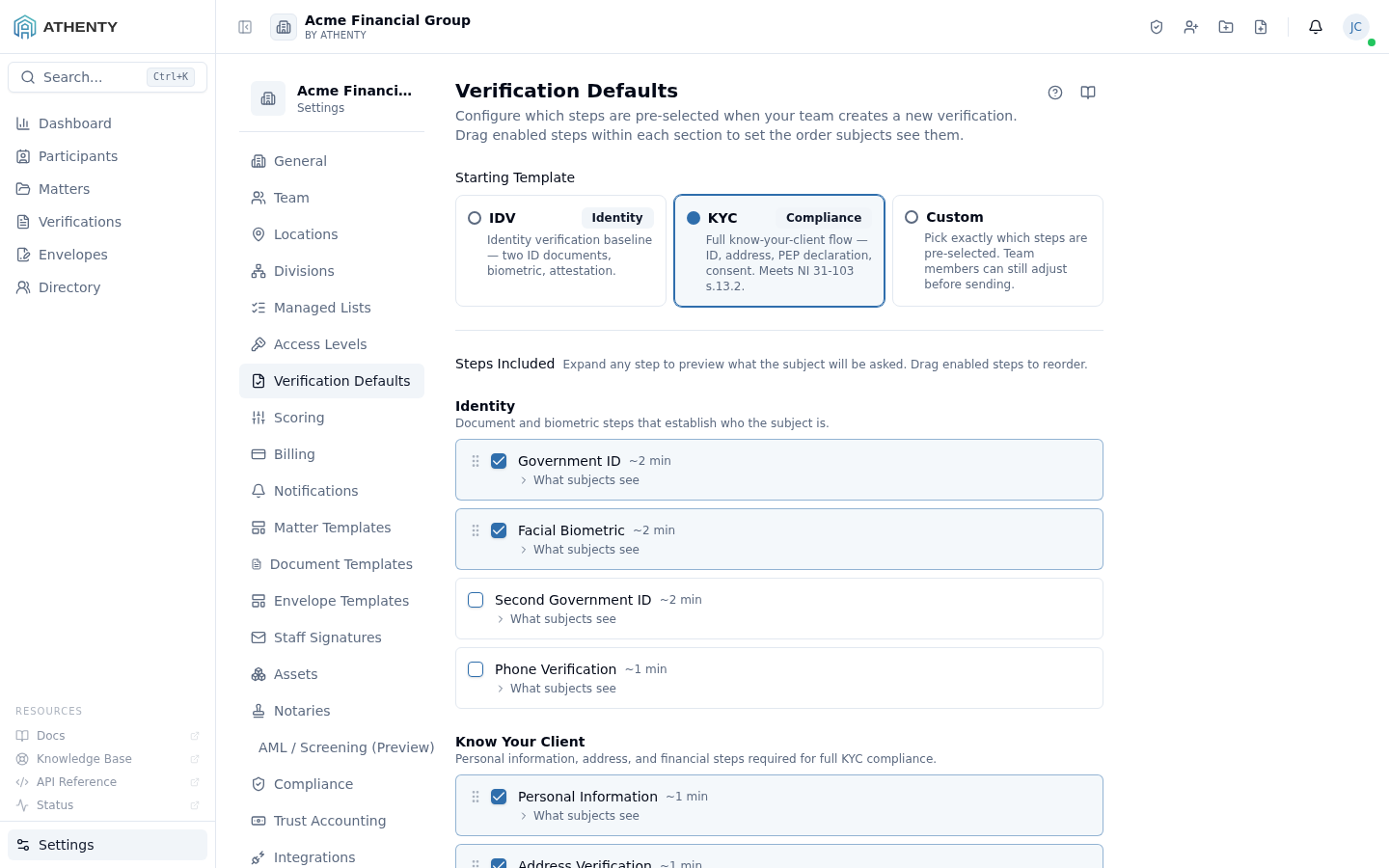
Anatomy of the page
Section titled “Anatomy of the page”1. Page header
Section titled “1. Page header”Standard PageHeader with the title Verification Defaults and a multi-line description.
2. Starting Template
Section titled “2. Starting Template”A 3-card grid: Default / IDV Template / KYC Template. Picking IDV or KYC swaps the step grid below to that template’s seeded list. Picking Default keeps the custom list intact.
Plan-gated cards show a locked overlay with an upgrade tooltip when the tenant’s plan doesn’t include the underlying capability (e.g., KYC on Starter).
3. Default Type
Section titled “3. Default Type”When Default is the active template, this radio selects the
underlying type (idv or kyc) the wizard pre-selects. Hidden when
IDV / KYC / Custom is the active template.
4. Step grid
Section titled “4. Step grid”A grouped checkbox grid:
| Group | Steps |
|---|---|
| Identity | document, person, biometric_face |
| Address & Contact | location, contact |
| Compliance | pep_hio, consent |
| Sign-off | attestation, signature |
Each step has a checkbox, a label, and an estimated time-to-complete hint. Plan-gated steps render with a lock icon and upgrade tooltip.
5. Step order
Section titled “5. Step order”Below the grid, a drag-and-drop list of enabled steps. Drag the grip handle to reorder. The order here is the order subjects see steps in their verification flow.
Two server-enforced rules:
documentmust precedeperson(selfie compares to doc photo)attestationmust be last (legal requirement)
The drag handles are disabled where reordering would violate these.
6. Save action
Section titled “6. Save action”A standalone Save button that persists the entire form via
useUpdateVerificationDefaults. The mutation accepts the template
choice, default type, step list, and ordered list as one payload.
Plan gates
Section titled “Plan gates”Several steps are gated by plan tier:
| Step | Required tier |
|---|---|
pep_hio | Professional |
consent (advanced) | Professional |
| Bulk envelope-style packets | Business |
| Custom step authoring | Enterprise |
Gated steps appear in the grid for visibility but cannot be checked.
How defaults flow into the wizard
Section titled “How defaults flow into the wizard”When a user clicks New Verification:
- The wizard’s Type step pre-highlights the configured starting template
- If Default is the template, the underlying type is the configured default
- The Steps step pre-checks every step in the configured list
- The order shown to subjects is the order set here
Per-verification overrides are still allowed — defaults are just the opening hand.
Permissions and scope
Section titled “Permissions and scope”| Role | View | Edit |
|---|---|---|
| Owner / Admin | ✓ | ✓ |
| Member | Indirect (sees pre-selections in the wizard) | ✗ |
| Viewer | ✗ | ✗ |
Audit logging
Section titled “Audit logging”Save emits org.verification_defaults_updated with the diff. The event
surfaces in Settings ▸ Audit Log.
Troubleshooting
Section titled “Troubleshooting”| Symptom | Most likely cause | Fix |
|---|---|---|
| Step locked with upgrade tooltip | Plan tier excludes step | Upgrade under Settings ▸ Billing |
| Save fails | document/person/attestation order violated | Re-order to satisfy the rule |
| New defaults don’t appear in wizard | User had wizard open across the save | Refresh the wizard tab |
| Custom step doesn’t show in grid | Custom step authoring is Enterprise-only | Upgrade or use a stock step |
| Drag handle disabled | Reorder would violate a server-side rule | Adjust adjacent steps first |
Related pages
Section titled “Related pages”- Verifications ▸ New — the wizard that consumes these defaults
- Settings ▸ Scoring — controls deduction weights, complementary to step config
- Settings ▸ Billing — plan tier gates which steps are available
- Settings ▸ Audit Log —
org.verification_defaults_updatedevents