
Profile — Persona ▸ Notary
The Profile ▸ Persona ▸ Notary page is the user-facing application form for notary or commissioner-of-oaths credentials. It lets a member submit their appointment details, track the review status, and re-apply if the application is rejected.
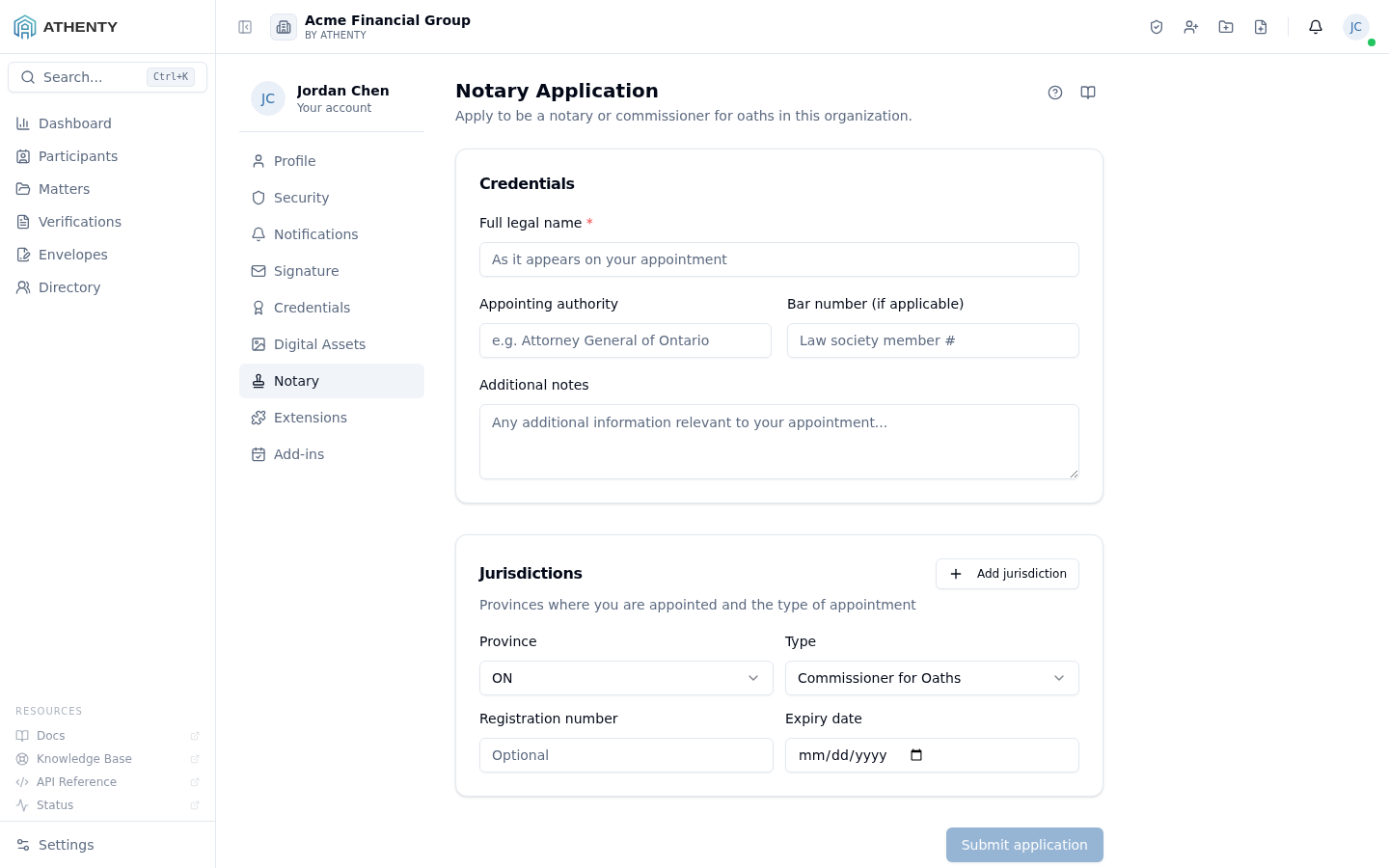
Anatomy of the page
Section titled “Anatomy of the page”1. Page header
Section titled “1. Page header”Standard PageHeader with the title Notary Application and a description that adapts based on whether you have an existing application. Lives at the top of the right-hand content panel under the Profile left-nav.
2. State-driven body
Section titled “2. State-driven body”The body changes based on the user’s application status:
| Status | Body |
|---|---|
| No application | The two-section form (Credentials + Jurisdictions) |
| Pending | A status card with the Under Review pill |
| Approved | A status card with the Approved pill + jurisdictions |
| Suspended | A status card with the Suspended pill + admin note |
| Rejected | The form, optionally pre-filled, ready to re-submit |
Form sections
Section titled “Form sections”Credentials
Section titled “Credentials”- Full legal name (required) — written exactly as it appears on your appointment certificate
- Appointing authority — for context (e.g., Attorney General of Ontario); not required because some appointments are made by the law society itself
- Bar number — provided when you’re a lawyer; admins can cross-reference your law society directory
- Additional notes — free-form context
Jurisdictions
Section titled “Jurisdictions”A repeating list with Add jurisdiction for additional rows. Each row captures:
- Province — drop-down of the 13 Canadian provinces and territories
- Type —
commissioner(Commissioner for Oaths) ornotary_public(Notary Public) - Registration number — your provincial appointment ID
- Expiry date — when the appointment lapses
Multi-jurisdiction is common for lawyers; commissioners are typically single-province. The form keeps a minimum of one row.
Status card
Section titled “Status card”Once an application is filed, the form is replaced with a status card showing:
- An icon + pill for the current status
- The submitted full legal name (echoed back)
- An admin note (if any was attached during review, suspension, or rejection)
- A Jurisdictions section listing every approved appointment
For Approved, the card is informational; for Pending, it confirms the submission; for Suspended, it surfaces the admin’s reason.
Lifecycle
Section titled “Lifecycle”no application ──▶ pending ──▶ approved ↘ rejected (re-apply allowed) ↘ suspended (admin contact)The state transitions are admin-controlled (under Settings ▸ Compliance ▸ Notaries). Once approved, the user can be assigned to RON Sessions and their notary stamps appear on completed envelope audit PDFs.
Reminders
Section titled “Reminders”The platform watches the Expiry date field and emits a reminder notification 60 days before any jurisdiction lapses. The reminder lands in the user’s bell icon and (if email notifications are on) their inbox. This gives the notary time to renew their appointment with the relevant authority before it expires.
Permissions and scope
Section titled “Permissions and scope”| Role | Can submit own application | Can review others |
|---|---|---|
| Owner / Admin | ✓ | ✓ (via Settings ▸ Compliance) |
| Member | ✓ | ✗ |
| Viewer | Read-only | ✗ |
The admin review surface is at Settings ▸ Compliance ▸ Notaries and is hidden for non-admin roles. This Profile page is visible to everyone but only relevant if you hold notary credentials.
Audit trail
Section titled “Audit trail”Every action emits an audit event:
notary.application_submittednotary.application_approvednotary.application_rejectednotary.suspendednotary.reinstated
These events surface in Settings ▸ Audit Log for admins and in the applicant’s own Profile ▸ Security ▸ Activity tab.
Troubleshooting
Section titled “Troubleshooting”| Symptom | Most likely cause | Fix |
|---|---|---|
| Submit button disabled | Required Full legal name missing | Fill the name field |
| No status card after submit | Backend race; cache stale | Refresh the page |
| Suspended without an admin note | Admin omitted the note | Reach out directly; the platform doesn’t auto-explain suspensions |
| Reapply form not pre-filled | Schema migration since prior application | Fill from scratch; admin can clean up legacy records |
| Rejected application stays Pending | Admin still in queue or batched review | Wait for the admin’s queue cycle; nudge offline if urgent |
Related pages
Section titled “Related pages”- RON Sessions — what you can do once approved
- Profile ▸ General — view your profile and audit feed
- Settings ▸ Compliance — admin review surface for notary applications