
Settings — Matter Templates
The Settings ▸ Matter Templates page is the admin authoring surface for reusable matter creation templates. Each template defines the defaults the New Matter wizard pre-fills — type, status, assigned staff, sharing rules, and required documents — so creating a matter is a one-click operation when the practice area is well-modeled.
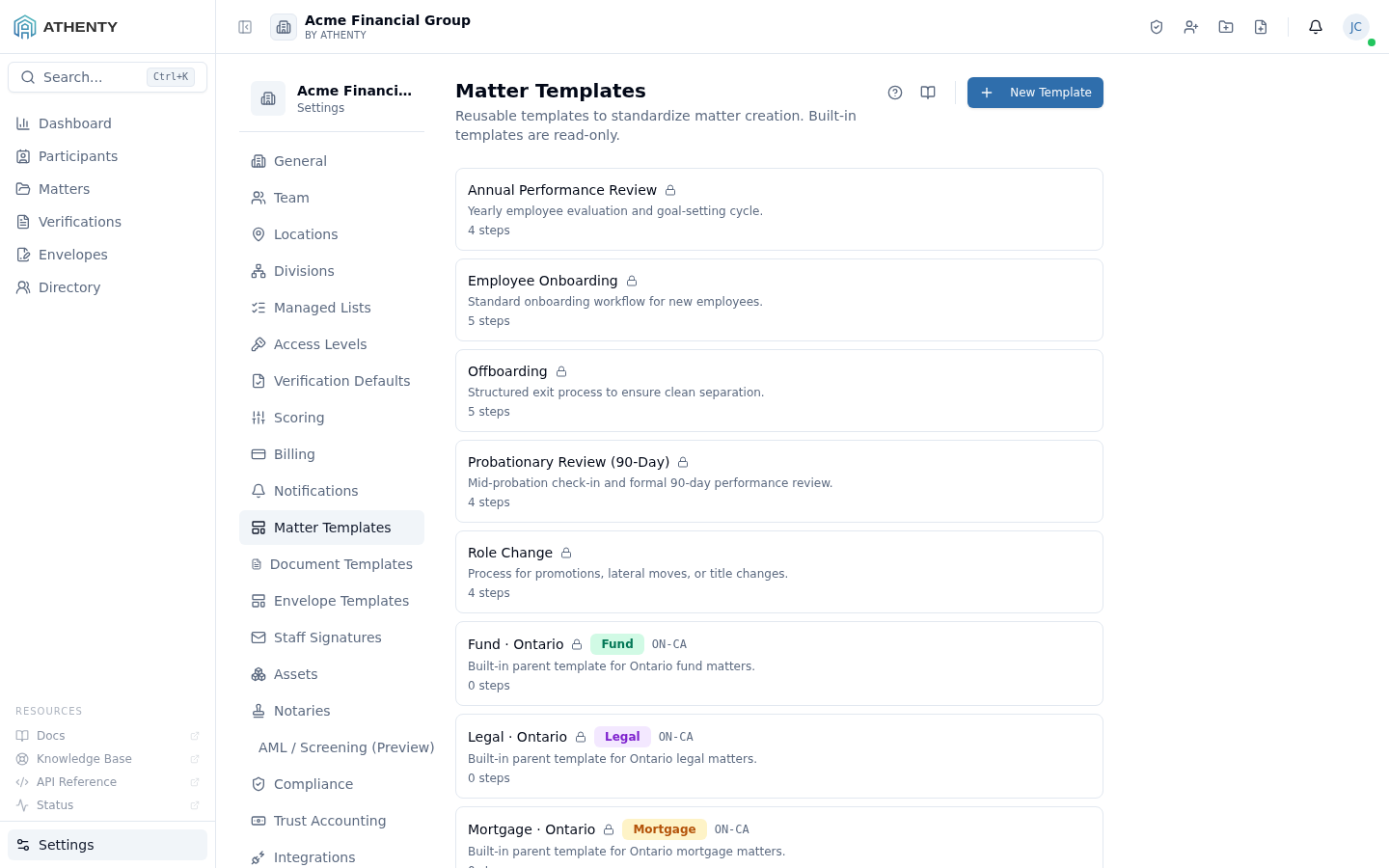
Anatomy of the page
Section titled “Anatomy of the page”1. Page header
Section titled “1. Page header”Standard PageHeader with the title Matter Templates and a one-line description noting that built-in templates are read-only. The New Template button sits to the right.
2. Template list
Section titled “2. Template list”Each row carries:
- Template name + description
- 🔒 Built-in badge for the seeded read-only templates
- Parent template name (if inherited)
- Matter type
- Row actions (Edit, Duplicate, Delete) — Edit and Delete are disabled on built-ins
3. Slide-out editor
Section titled “3. Slide-out editor”The create / edit slide-out captures:
- Name and description
- Parent template picker (for inheritance)
- Matter type from Settings ▸ Managed Lists ▸ Matter Types
- Default status / sub-status
- Assigned staff template (which roles auto-assign)
- Sharing defaults
- Required documents checklist
Built-in templates
Section titled “Built-in templates”The platform ships with a set of seeded templates representing common practice areas. They cover:
- Real Estate (with Purchase / Sale / Refinance child variants)
- Estate Planning
- Corporate / Commercial
- Litigation
- Family Law
- Immigration
- Tax
Built-ins are read-only. You can use them, duplicate them into custom templates, but never edit or delete the seeded versions. This is enforced server-side — a forced PATCH on a built-in returns 403.
Inheritance model
Section titled “Inheritance model”A custom template can pick another template as its parent. Inheritance is single-level (no chains beyond parent → child) and field-by-field:
- Every field on the child is initially the parent’s value
- Overriding any field on the child unsets the inheritance for that field only
- Removing the override re-inherits
The parent name displays inline on each child template’s row so you can see the inheritance graph at a glance.
New Matter wizard integration
Section titled “New Matter wizard integration”When a user starts a new matter:
- The wizard’s first step shows a template picker
- Picking a template pre-fills type, status, assigned staff, sharing, and required-doc checklist
- The user can override any field per-matter
- Required-document checklist becomes a “Documents to upload” tracker on the matter detail page
Permissions and scope
Section titled “Permissions and scope”| Role | View | Use in wizard | Create/edit custom | Delete custom |
|---|---|---|---|---|
| Owner / Admin | ✓ | ✓ | ✓ | ✓ |
| Member | (in wizard only) | ✓ | ✗ | ✗ |
| Viewer | ✗ | ✗ | ✗ | ✗ |
Built-ins are server-enforced read-only for every role including Owner.
Audit logging
Section titled “Audit logging”| Action | Event |
|---|---|
| Create | matter_template.created |
| Update | matter_template.updated |
| Duplicate | matter_template.duplicated |
| Delete | matter_template.deleted |
Events surface in Settings ▸ Audit Log.
Troubleshooting
Section titled “Troubleshooting”| Symptom | Most likely cause | Fix |
|---|---|---|
| Cannot delete | Has child templates inheriting | Re-parent or delete children first |
| Built-in uneditable | Read-only server-side | Duplicate to a custom version |
| Required doc not enforced | Wizard cached pre-template | Refresh wizard |
| Inherited field stale | Parent change post-dates child render | Re-save child to refresh inheritance |
| Save fails | Name empty | Fill name (required) |
Related pages
Section titled “Related pages”- Matters — list view; matters created from these templates
- Settings ▸ Managed Lists — Matter Type list that powers the template picker
- Settings ▸ Audit Log —
matter_template.*events