
Settings — Integrations
The Settings ▸ Integrations page is the connection surface for mirroring Athenty’s general ledger to external accounting systems. Two providers are supported today: QuickBooks Online and Xero.
The platform’s design is one-way mirror. Athenty posts authoritative journal entries; the integration replicates them to your accounting system so your bookkeeper sees the same numbers. Athenty never reads back from the external system.
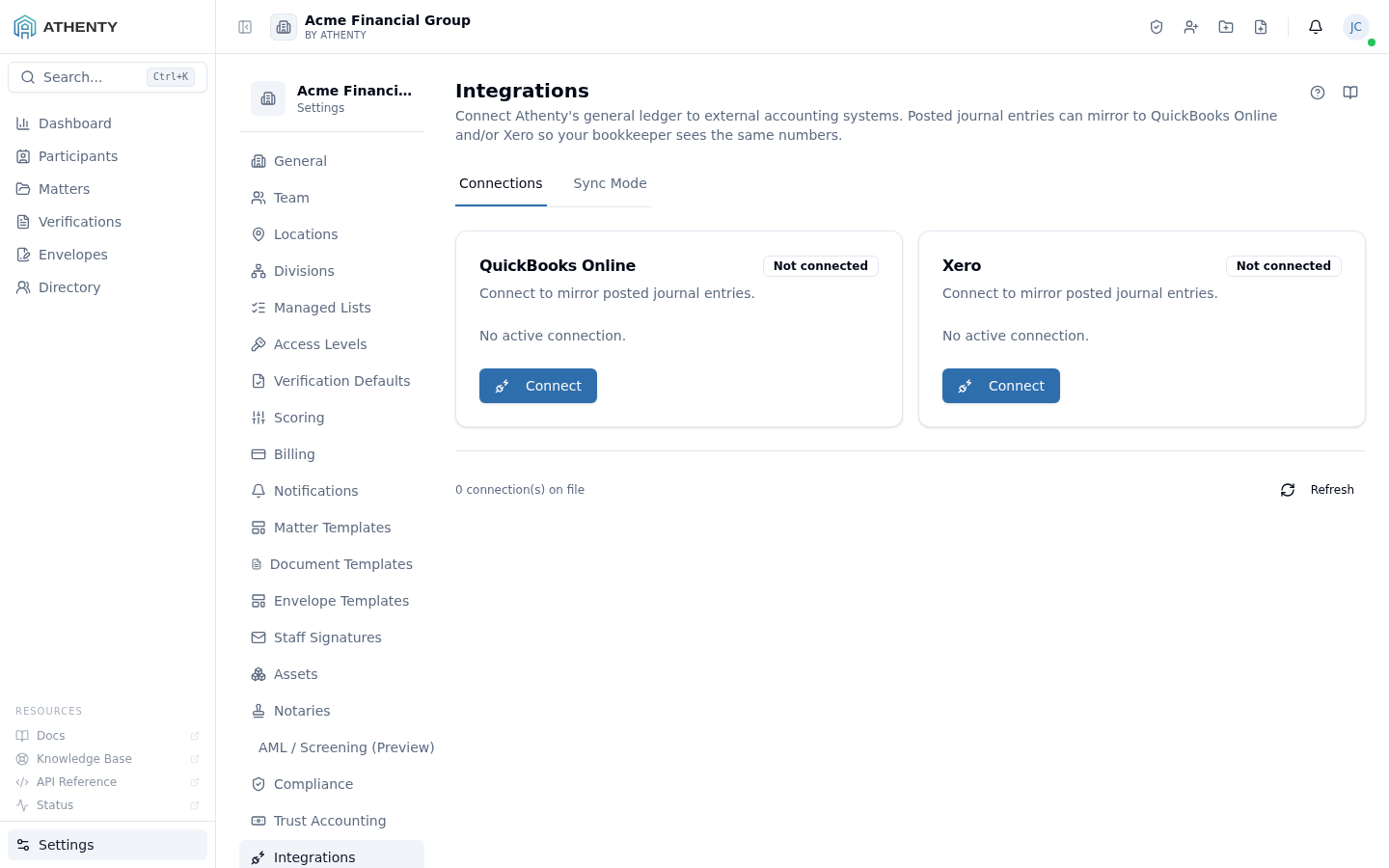
Anatomy of the page
Section titled “Anatomy of the page”1. Page header
Section titled “1. Page header”Standard PageHeader with the title Integrations and a multi-line description.
2. Two-tab layout
Section titled “2. Two-tab layout”The page uses a Tabs container with two tabs:
| Tab | Contents |
|---|---|
| Connections | Per-provider connect/disconnect + account mapping |
| Sync Mode | Live / Batched / Off radio group |
The active tab is reflected in the URL via the standard search-param pattern.
Connections tab
Section titled “Connections tab”Each provider has a card with:
- Provider logo + name
- Connection status pill (Disconnected / Connected / Error)
- When connected: company / organization name, last-sync timestamp
- Action button: Connect (when disconnected), Disconnect (when connected)
- An expanded mapping table when connected — Athenty account ↔ provider account
OAuth flow
Section titled “OAuth flow”- User clicks Connect
- The platform initiates an OAuth 2.0 Authorization Code flow with the provider
- The user authenticates and selects the target company/org
- The provider redirects back with an authorization code
- The platform exchanges the code for a refresh token and stores it encrypted at rest
- The platform discovers the provider’s chart of accounts and surfaces the mapping table
Refresh tokens have provider-specific TTLs (QBO: 100 days, Xero: 60 days). The platform refreshes proactively before expiry.
Account mapping
Section titled “Account mapping”The mapping table pairs Athenty’s standard numeric chart with the provider’s account list:
Athenty 1000 Operating Bank → QBO "Operating Cash" (id: 42)Athenty 1100 Trust Bank → QBO "Trust Account" (id: 47)Athenty 2100 Client Trust → QBO "Trust Liab" (id: 81)Athenty 4000 Revenue → QBO "Sales" (id: 12)...Unmapped accounts surface a warning. Sync pauses until every required account has a target.
Sync Mode tab
Section titled “Sync Mode tab”Three options:
| Mode | Behaviour |
|---|---|
| Live (default) | Every posted journal entry mirrors within ~30 s |
| Batched | Entries queue; flushed every 4 h |
| Off | No entries flow; OAuth grant remains intact |
Switching modes is a no-op on the connection itself — only the queue behaviour changes.
Permissions and scope
Section titled “Permissions and scope”| Role | View | Connect | Disconnect | Mode |
|---|---|---|---|---|
| Owner | ✓ | ✓ | ✓ | ✓ |
| Admin | ✓ | ✓ | ✓ | ✓ |
| Member | ✗ | ✗ | ✗ | ✗ |
| Viewer | ✗ | ✗ | ✗ | ✗ |
OAuth tokens are tenant-scoped and encrypted at rest. Athenty infrastructure operators cannot read refresh tokens in plaintext; the encryption key lives in a separate KMS boundary.
Audit logging
Section titled “Audit logging”| Action | Event |
|---|---|
| Connect | integration.connected (provider) |
| Disconnect | integration.disconnected |
| Mode change | integration.sync_mode_updated |
| Mapping change | integration.mapping_updated |
| Sync failure | integration.sync_failed (with provider error) |
These events surface in Settings ▸ Audit Log alongside other org events.
Implementation note
Section titled “Implementation note”The mirror runs as an out-of-band worker reading from a journal_sync_queue
table. Live mode dequeues immediately; Batched dequeues every 4 hours.
Worker failures are retried with exponential backoff and emit
integration.sync_failed for any persistent failure that exceeds the
retry budget.
Troubleshooting
Section titled “Troubleshooting”| Symptom | Most likely cause | Fix |
|---|---|---|
| Connect button errors | OAuth redirect URI not whitelisted | Contact support to verify redirect URI provisioning |
| Sync stuck after connect | Mapping incomplete | Map all required accounts; the table flags missing rows |
| 429 rate-limited (QBO) | Too many entries in Live mode | Switch to Batched mode |
| Xero “tenant deleted” | Org offboarded at Xero | Disconnect + re-connect |
| Disconnected status with no action | Refresh token expired | Re-connect; provider grant must be fresh |
Client-app oversight (Extensions · Add-ins · Companion)
Section titled “Client-app oversight (Extensions · Add-ins · Companion)”Beyond the third-party GL sync, the Integrations page gives admins firm-wide oversight of the Athenty client apps, each on its own tab:
- Extensions — the browser extension.
- Add-ins — the Gmail and Outlook add-ins.
- Companion — the desktop document-editing helper.
Each tab shows an org-level on/off and an active-user roster (reported version + last-seen). Turning a surface off refuses new pairings immediately and stops already-paired clients within one access-token lifetime (~15 minutes); for Companion it blocks the handshake. Versions populate once the client apps are updated to report them. Per-user access for the extension/add-ins can be revoked from the roster; each user still installs and manages their own client from Profile ▸ Integrations.
Related pages
Section titled “Related pages”- Settings ▸ Trust Accounting — the ledger this mirrors out
- Settings ▸ Audit Log —
integration.*events - Settings ▸ Webhooks — adjacent integration mechanism (event-driven, not GL-mirroring)