
Matters — Detail Page
The Matter detail page (/matters/:id) is the deep-dive on a
single matter. Where the Matters list is your full caseload at a
glance, the detail is where the actual work happens — adding
participants, uploading documents, posting time, sending envelopes,
running due-diligence workflows.
The page is structured around a strict two-level tab strip so each domain has its own URL and deep-link surface, locked in by issue #196’s information-architecture rework.
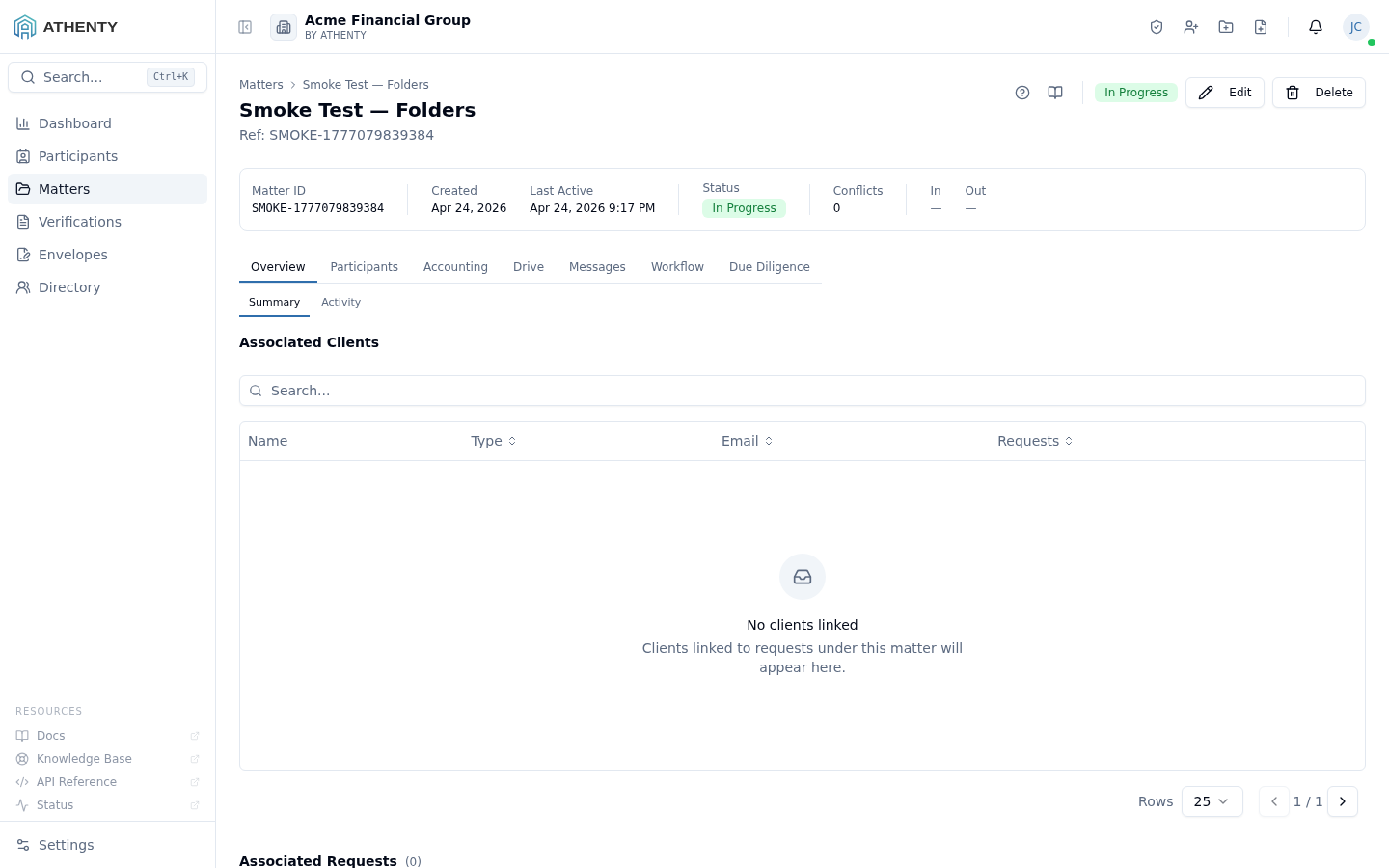
Anatomy of the page
Section titled “Anatomy of the page”1. Page header
Section titled “1. Page header”PageHeader with the matter’s name as the title and the matter reference as the description. Breadcrumbs link back to the Matters list. Action area carries the status pill, Edit, and Delete buttons.
2. Stats strip
Section titled “2. Stats strip”A bordered card below the header surfaces at-a-glance facts:
- Matter ID + type
- Primary client
- Opening, last-activity, and closing dates
- Status + sub-status
The matter’s description, when present, wraps to a second row inside the same card.
3. Top tabs (7)
Section titled “3. Top tabs (7)”| Top tab | Domain |
|---|---|
| Overview | Summary, Activity |
| Participants | Clients, Counterparties, Third-parties, Assigned Staff |
| Accounting | Trust, Disbursements, Billings |
| Drive | Files, Envelopes, Emails, Shared |
| Messages | Internal, Client |
| Workflow | Notifications, Kanban |
| Due Diligence | Searches, Reports, Requisitions, Undertakings |
The seven top tabs are stable across all matter types — IA is the same whether you’re working a real estate transaction or a litigation file.
4. Sub-tabs (per top tab)
Section titled “4. Sub-tabs (per top tab)”Each top tab has a list of sub-tabs that scope the body. The active
sub-tab is reflected in the URL as ?tab=top&sub=sub.
5. Tab body
Section titled “5. Tab body”The body changes per (top, sub) pair. Most surfaces are stand-alone
components composed in: MatterParticipantsTab, MatterFolderTree,
MatterEnvelopesTab, MatterMessagesInternalTab, etc.
URL model
Section titled “URL model”/matters/:id?tab=drive&sub=files/matters/:id?tab=overview&sub=summaryPre-#196 single-strip URLs (?tab=fees, ?tab=comments, …) auto-redirect
to the new (top, sub) pair via a redirect map in
matter-detail-page.tsx. External bookmarks keep working.
Tab gates
Section titled “Tab gates”Some tabs are gated by tenant plan or matter status:
| Gate | Behaviour |
|---|---|
| Plan excludes Trust Accounting | Accounting > Trust shows an upgrade banner |
| Document hold active | Drive deletes are refused; banner shown |
| Matter is closed | Edit/Delete disabled by default; Owner can override |
Edit + delete
Section titled “Edit + delete”The Edit button opens a slide-out with the same form used by New
Matter, pre-filled. Saving emits matter.updated with a typed diff
payload to the audit log.
Delete is hard-delete only when the matter has zero trust ledger entries and zero linked envelopes. Otherwise the platform refuses the delete and surfaces a toast pointing to Settings ▸ Trust Accounting for the retention purge workflow.
Permissions and scope
Section titled “Permissions and scope”| Role | View | Edit | Add participants | Delete |
|---|---|---|---|---|
| Owner / Admin | ✓ | ✓ | ✓ | ✓ |
| Member (assigned) | ✓ | ✓ | ✓ | ✗ |
| Member (not assigned) | List shows locked row + request access | ✗ | ✗ | ✗ |
| Viewer | Read-only | ✗ | ✗ | ✗ |
Per-tab permission overrides are evaluated server-side in addition to the role check.
Audit logging
Section titled “Audit logging”| Action | Event |
|---|---|
| Edit | matter.updated (with diff) |
| Delete | matter.deleted |
| Hold apply / release | matter.hold_applied / _released |
| Participant add | matter_participant.added |
| Document upload | matter_document.created |
| Trust posting | trust.entry_posted |
Events surface in Settings ▸ Audit Log.
Troubleshooting
Section titled “Troubleshooting”| Symptom | Most likely cause | Fix |
|---|---|---|
| 403 on detail load | Not assigned | Use Request access on the list |
| Tab hidden | Plan tier exclusion | Upgrade under Settings ▸ Billing |
| Edit disabled | Document hold | Release under Settings ▸ Matters ▸ Document Hold |
| Delete fails | Trust ledger entries present | Use the trust retention purge workflow |
| Legacy URL not redirecting | Tab name not in the redirect map | Use the new (top, sub) URL form |
Related pages
Section titled “Related pages”- Matters — list view; this page is the per-record drill-in
- Settings ▸ Matters ▸ Document Hold — hold defaults and release authority
- Settings ▸ Trust Accounting — retention purge gate for delete
- Settings ▸ Audit Log —
matter.*events