
Profile — Security ▸ Notifications
The Profile ▸ Security ▸ Notifications page is where each member tunes their personal notification preferences. The toggles here decide which events land in your bell icon and which send you an email — they do not affect what other members of your organization receive.
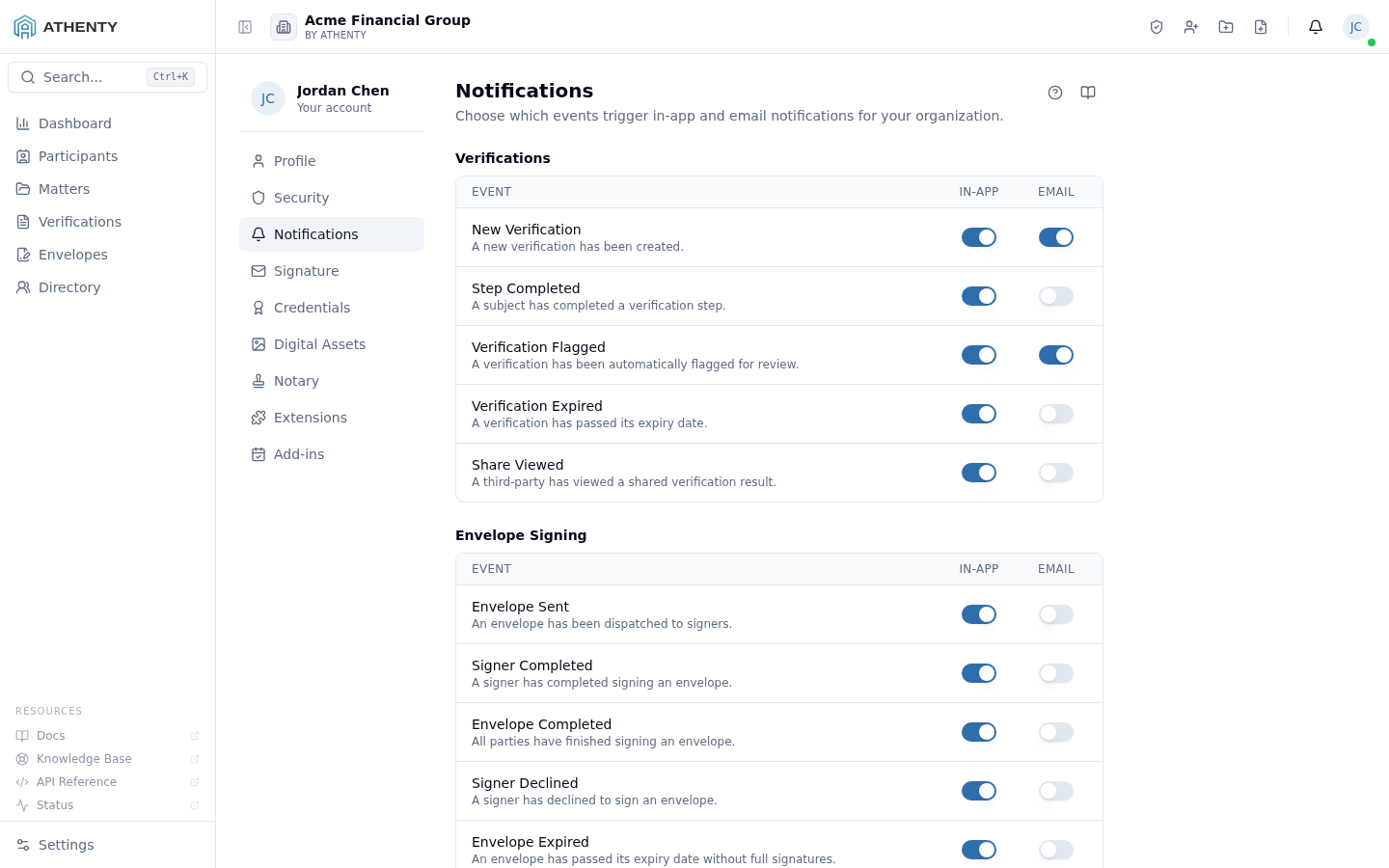
Anatomy of the page
Section titled “Anatomy of the page”1. Page header
Section titled “1. Page header”Standard PageHeader with the title Notifications and a one-line description. Lives at the top of the right-hand content panel under the Profile left-nav.
2. Section list
Section titled “2. Section list”Each section is one feature area; rows inside it are individual events with two toggles (in-app + email).
Section list as of writing:
| Section | Events |
|---|---|
| Verifications | Created · Sent · Started · Completed · Approved · Rejected · Expired |
| Envelope Signing | Sent · Signed by recipient · Fully completed · Declined · Voided |
Future sections (Matters, Trust Accounting, Compliance) will appear as those features ship.
3. Reset to Defaults
Section titled “3. Reset to Defaults”The Reset to Defaults button at the bottom of the toggle list restores the org-recommended preset. The preset is typically all in-app on, email on for critical events only; admins can change the preset by re-shipping the seed file under Settings ▸ Notification Templates.
4. Custom email footer (owners only)
Section titled “4. Custom email footer (owners only)”A textarea section visible only when your role is Owner. Anything you put here is appended below Athenty’s standard footer on every envelope-related email dispatched from your tenant — a common use case is a regulator-required disclaimer or your firm’s contact details.
- Max ~1000 characters (counter shown inline)
- Plain text only (HTML is rendered escaped server-side)
- Saves on Save changes, not on blur or autosave
Members and admins see the toggles only — the footer section is gated to the owner role.
Auto-save behaviour
Section titled “Auto-save behaviour”The per-event toggles auto-save with optimistic UI:
- Click the toggle → switch flips immediately
- PATCH request fires in background
- Saving… spinner shows for the in-flight duration
- On error, the toggle rolls back and a toast surfaces the failure
There is no batch save — every click is its own mutation. This makes the page safe to leave at any point.
The custom-email-footer section behaves differently: edits stay in local form state until you click Save changes.
How toggles map to delivery
Section titled “How toggles map to delivery”| In-app toggle | Email toggle | Effect |
|---|---|---|
| On | On | You see the event in the bell icon AND get an email |
| On | Off | You see the event in the bell icon only |
| Off | On | No bell icon notification, only an email |
| Off | Off | The event is suppressed for you entirely |
Suppressed events still log to Settings ▸ Audit Log for compliance purposes — the toggles only affect your inbox + bell, not the underlying event record.
Permissions and scope
Section titled “Permissions and scope”| Role | Visible sections |
|---|---|
| Owner | Toggles + custom email footer |
| Admin | Toggles only |
| Member | Toggles only |
| Viewer | Toggles read-only |
Org-level routing — quiet hours, default channels for new users, branded templates — lives under Settings ▸ Notification Templates.
Audit logging
Section titled “Audit logging”Every preference change emits notification.preference_updated to your
own audit feed. The custom email footer write emits org.settings_updated
with the diff. Both surface in Settings ▸ Audit Log for admins.
Troubleshooting
Section titled “Troubleshooting”| Symptom | Most likely cause | Fix |
|---|---|---|
| Toggle reverts | Network error; optimistic update rolled back | Check toast; retry on stable connection |
| Email never arrives | Spam filter or wrong account email | Verify in Profile ▸ General |
| In-app notification missing on a tab | Background tab missed sync | Refocus tab or refresh; counts re-sync on visibility |
| Custom footer section hidden | Role is not Owner | Footer is owner-gated |
| Save changes greyed | No edits made yet | Edit the textarea first |
Related pages
Section titled “Related pages”- Notifications — the in-app feed of events you allowed in-app
- Profile ▸ General — email address used for delivery
- Settings ▸ Notification Templates — admin-level templates and quiet hours
- Settings ▸ Audit Log — full event trail