
Settings — Team Member
The Team member page (/settings/team/:userId) is the admin
view of any user’s HR record. The same data plane the user sees at
Account ▸ Profile in suggest-only mode is exposed here in full
read/write mode for admins, gated tab-by-tab.
This is where HR onboarding and offboarding happen, and where admins approve or counter user-filed suggest-edits.
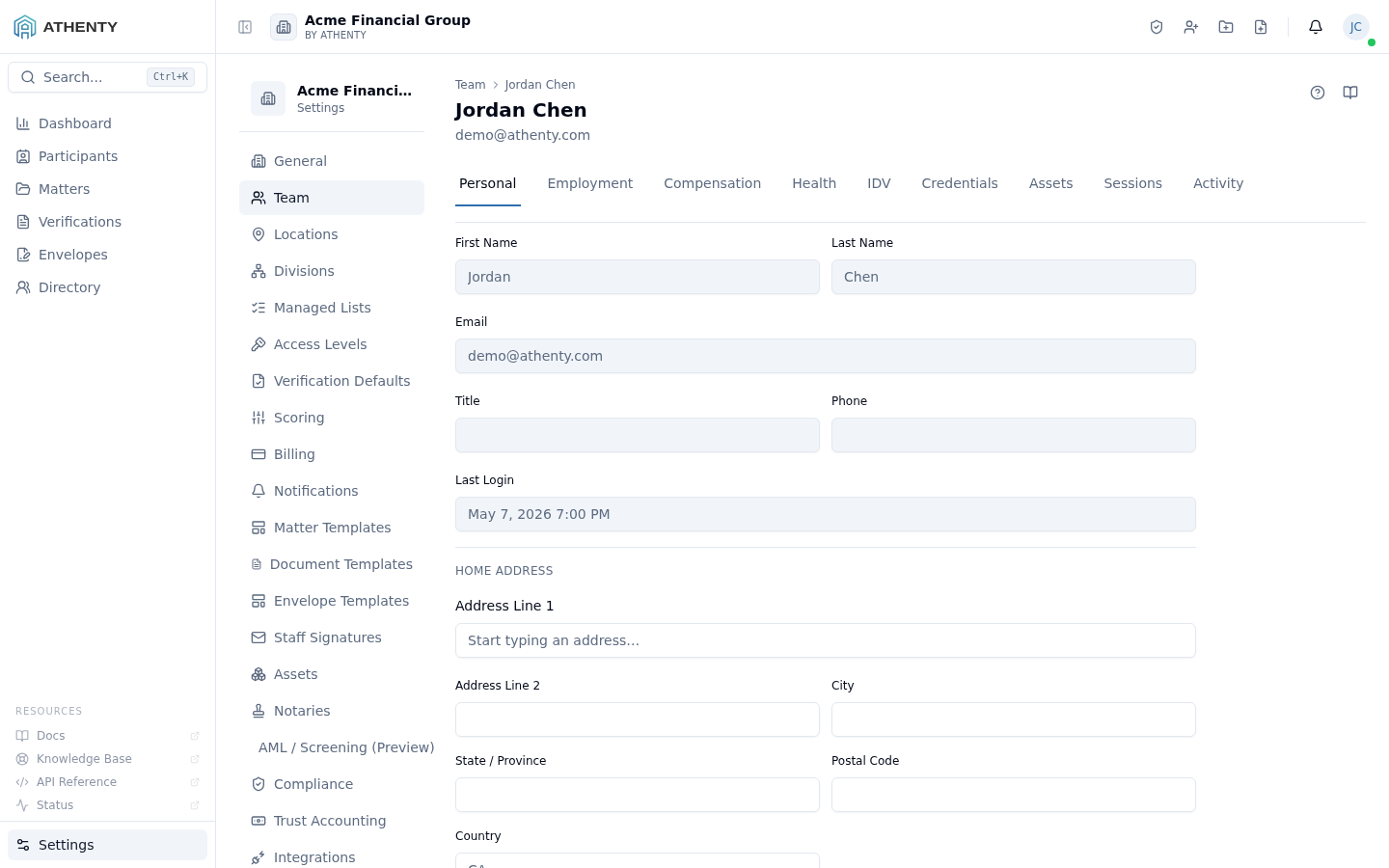
Anatomy of the page
Section titled “Anatomy of the page”1. Page header
Section titled “1. Page header”PageHeader with the user’s display name and email. Breadcrumbs link back to Settings ▸ Team.
2. Tab strip
Section titled “2. Tab strip”Nine tabs, role-gated:
| Tab | Owner | Admin | Notes |
|---|---|---|---|
| Personal | ✓ | ✓ | Direct edit name / email / avatar / address |
| Employment | ✓ | ✓ | Title, dates, default location, emergency contact |
| Compensation | ✓ | ✓ | Salary band + currency |
| Health | ✓ | ✗ | Owner-only; encrypted at rest |
| IDV | ✓ | ✓ | Read status; can trigger new IDV from here |
| Credentials | ✓ | ✓ | Bar admissions, designations, licenses |
| Assets | ✓ | ✓ | Hardware + software assignment |
| Sessions | ✓ | ✓ | Active sessions + revoke |
| Activity | ✓ | ✓ | User-scoped audit feed |
The tab strip is horizontally scrollable on narrow screens.
3. Tab body
Section titled “3. Tab body”Tab bodies reuse the same components used by Account ▸ Profile
(ProfileTab, EmploymentTab, CompensationTab, …) but render
in admin-write mode here. The component looks at the current user’s
permission against the target user and shows the right write
controls.
Suggest-edit pattern
Section titled “Suggest-edit pattern”Users (on Account ▸ Profile) file suggest-edits for suggestable fields. Admins see them on this page as pending pills next to the affected field. The pill exposes Accept / Counter / Reject:
- Accept — applies the user’s value, marks the request resolved
- Counter — opens an inline editor; the new value goes back to the user for their accept/reject
- Reject — closes with a reason
Audit events:
profile_change_request.acceptedprofile_change_request.counteredprofile_change_request.rejected
Tab-by-tab detail
Section titled “Tab-by-tab detail”Personal
Section titled “Personal”Same fields as Account ▸ Profile ▸ Personal. Edits land directly on the user’s record (no suggest-edit gate for admins). Email changes show a confirmation dialog because email is the primary account identifier — changing it affects SSO mapping and password recovery.
Employment
Section titled “Employment”The full HR Employment record. Linked employment-agreement envelope (when present) shows a thumbnail with a download button.
Compensation
Section titled “Compensation”Salary band sourced from Settings ▸ Managed Lists ▸ Salary Band
plus a currency dropdown. Compensation events emit
hr.compensation_updated with the diff.
Health
Section titled “Health”Owner-only. The encrypted-at-rest health-conditions field, decrypted client-side via a tenant-scoped key. Auto-purged 24 hours after the user’s end date is set.
Status read-out plus a Run IDV action that opens
/verifications/new?subjectType=employee&employeeId=:userId so the
wizard pre-fills the subject.
Credentials
Section titled “Credentials”CRUD against the user’s professional credentials — same component as Account ▸ Credentials, in admin-write mode.
Assets
Section titled “Assets”Hardware + software assignment grid. Pulls from Settings ▸ Assets for the available-pool source.
Sessions
Section titled “Sessions”The user’s active sessions, per-row revoke, plus a “Sign out all” button at the top.
Activity
Section titled “Activity”The user-scoped audit feed sourced from GET /audit-log/users/:userId. Surfaces every event on the user’s
record — sign-ins, profile changes, suggest-edit decisions, role
changes.
Accounting
Section titled “Accounting”The Timekeeper and Partner flags plus the user’s billable
rate history. Turning on Timekeeper provisions the per-user
sub-GL accounts under 4001 Fixed Fee Revenue and 4002 Time Revenue keyed off the user’s nickname.
Timekeeper requires a complete rate card first
Section titled “Timekeeper requires a complete rate card first”Enabling Timekeeper is refused unless the user already has an active billable rate for every rate class that applies to them. This is a precondition, not a warning: the save does not go through, and the refusal names the rate classes still missing. Set the rates first (Settings ▸ Billable Rates), then turn the flag on.
The rule exists because every time entry must carry a rate — billable and non-billable alike. The reason is not billing, it is opportunity cost: a rate on non-billable time is how you tell, years later, what that work was worth and what writing it off cost the firm. Without it, a written-off hour is indistinguishable from an hour nobody worked.
The consequence is deliberate rather than an oversight. A person with no rate on file — an articling student, a new hire before their rate is set, a volunteer on a pro-bono file — cannot be made a timekeeper and so cannot record their own hours. The intended answer is to set up a rate for everyone you want to track, even a low one: a student’s time is still worth something to the client and costs the firm real capacity, and pro-bono means you will not bill the time, not that the time was worthless. In the meantime, someone who is not yet a timekeeper can still post time for other fully-set-up timekeepers.
Dockets saved before the rule — what happens when you invoice
Section titled “Dockets saved before the rule — what happens when you invoice”Time entries recorded before the rate became mandatory are left exactly as they are; nothing was rewritten. When you build a draft invoice from a matter’s WIP, any of those entries that still has no rate is held back rather than billed. It is not put on the invoice at $0.00 and it is not consumed — it stays in the matter’s WIP, still fully billable, until someone sets a rate on it and you generate again.
That is deliberate. Billing an unrated docket at $0.00 would print $0.00/hr on the client’s bill and permanently spend the time: once it is on an issued invoice it can never be billed without voiding that invoice. If every piece of unbilled work on the matter is held back this way, the invoice is refused outright and the message tells you how many entries need a rate.
Permissions and scope
Section titled “Permissions and scope”| Role | Read this page | Edit | Run IDV | Revoke sessions |
|---|---|---|---|---|
| Owner | ✓ | ✓ (all tabs) | ✓ | ✓ |
| Admin | ✓ | ✓ (Health is Owner-only) | ✓ | ✓ |
| Member (HR add-on) | ✓ | ✓ (HR-flavoured tabs only) | ✓ | ✗ |
| Member (no HR) | ✗ | ✗ | ✗ | ✗ |
| Viewer | ✗ | ✗ | ✗ | ✗ |
The HR add-on is configured under Settings ▸ Access Levels.
Audit logging
Section titled “Audit logging”Every per-tab edit emits a typed event:
| Tab | Events |
|---|---|
| Personal | user.updated, user.email_changed, user.avatar_changed |
| Employment | hr.employment_updated |
| Compensation | hr.compensation_updated |
| Health | hr.health_updated |
| IDV | hr.idv_run (when triggered from here) |
| Credentials | credential.created / _updated / _deleted |
| Assets | hardware.assigned / _unassigned |
| Sessions | auth.session_revoked_by_admin |
Events surface in Settings ▸ Audit Log and on the user’s own Account ▸ Profile ▸ Activity tab.
Troubleshooting
Section titled “Troubleshooting”| Symptom | Most likely cause | Fix |
|---|---|---|
| Health tab missing | Role is Admin not Owner | Owner-only |
| Email change blocked | Already in use | Pick a different email |
| Compensation read-only | Acting role is Member with HR add-on | Promote to Admin / Owner for compensation |
| Tab body empty | Cache stale | Refresh the page |
| Suggest-edit pill stuck | UI cache after accept/reject | Refresh tab |
Related pages
Section titled “Related pages”- Account ▸ Profile — user-side equivalent of this page
- Settings ▸ Team — the team list with role + HR controls
- Settings ▸ Access Levels — HR add-on toggle
- Settings ▸ Managed Lists — Salary Band, Employment Type lists
- Settings ▸ Audit Log —
user.*,hr.*,credential.*events