
Introduction
What Is the Outlook Add-in?
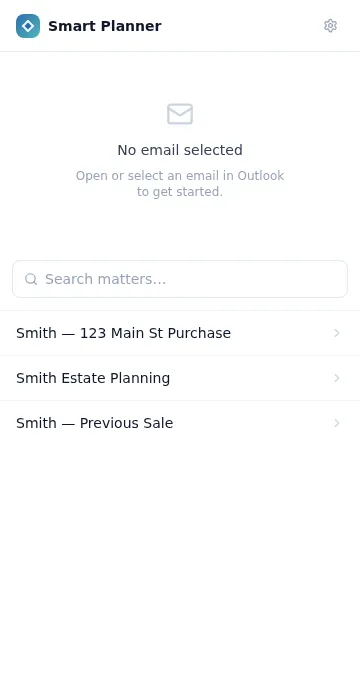
Section titled “What Is the Outlook Add-in?”The Athenty Matter Planner Outlook Add-in is a native Microsoft Office task pane add-in that lets you link an open Outlook email to a matter in Athenty Matter Planner. Open any email, search for the relevant matter, and tap Link — the email metadata (subject, sender, recipients, thread ID, date, and snippet) attaches to the matter’s Emails tab without you leaving Outlook.
The add-in renders in the Outlook reading pane task panel. It works in the same session where you read your email — no separate window, no browser extension required.
Who Is It For?
Section titled “Who Is It For?”The Outlook Add-in is designed for Athenty Matter Planner users who use Microsoft Outlook as their primary email client. It is particularly useful for:
- Lawyers and compliance officers who need a permanent email audit trail attached to a matter
- Firms that use Microsoft 365 or Exchange and want email archiving without switching applications
- Teams that receive high-volume client correspondence and need to route emails to the correct matter quickly
Prerequisite: Your organization must have the Matter Planner add-on enabled. Contact your Athenty account admin or see Pricing to enable it.
Supported Outlook Surfaces
Section titled “Supported Outlook Surfaces”| Outlook Surface | Supported |
|---|---|
| Outlook Web (OWA) | ✓ |
| New Outlook for Windows | ✓ |
| Classic Outlook for Windows | ✓ |
| Outlook for Mac | ✓ |
| Outlook Mobile (iOS / Android) | — (Microsoft limitation) |
How Emails Are Linked
Section titled “How Emails Are Linked”When you click Link to matter, the add-in sends the following fields to Athenty Matter Planner:
- Subject line
- Sender name and email address
- Recipients (To and CC)
- Internet message ID (for deduplication)
- Outlook conversation ID
- Sent date and time
- Plain-text body snippet (first ~512 characters)
- Full plain-text body (up to 65,000 characters)
- Attachment names, MIME types, and sizes (content upload not yet available)
Email content is processed by the Athenty API and stored against the matter record. It is not stored by the add-in itself.
Security
Section titled “Security”The add-in uses Microsoft’s ReadItem permission scope — the minimum required to read an open email. It cannot:
- Send or compose email
- Move, label, or delete messages
- Access other messages in your mailbox
- Read calendar or contact data
Your Athenty session token is stored in Outlook’s roamingSettings — per-user, per-add-in storage managed by Microsoft. Tokens are scoped to matter operations only and can be revoked at any time from Settings → General → Matter Planner Add-ins in your Athenty dashboard.
For setup instructions, see Getting Started.