
Settings — Team
The Settings ▸ Team page is the admin surface for managing every
member of your organization. The page is exposed at /settings/team,
with /settings/users redirecting here for backward compatibility.
The page complements Account ▸ Profile, which is each member’s own view of their personal record. Settings ▸ Team is the same data plane seen from the admin side, with full edit rights and the org-level security policy controls.
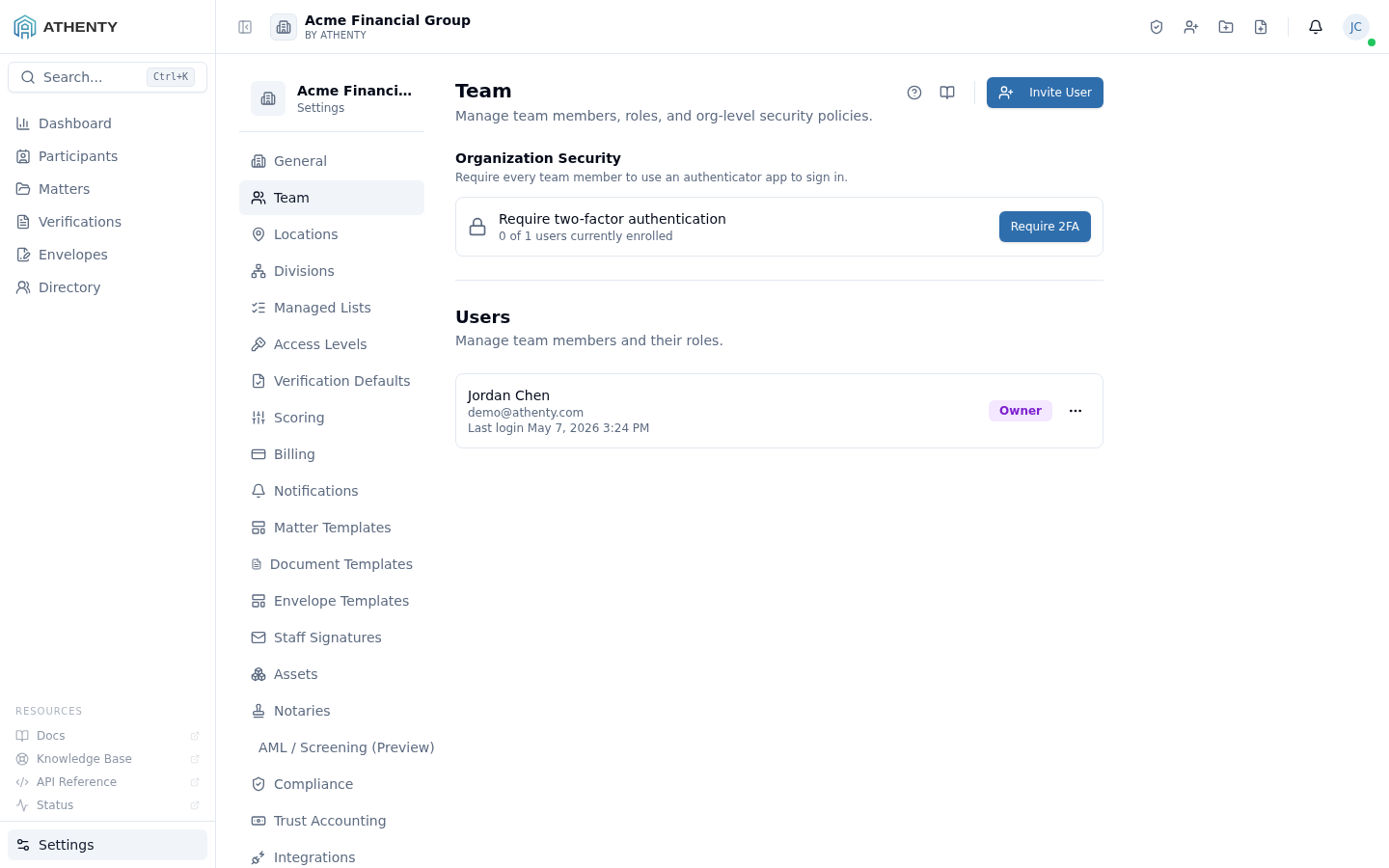
Anatomy of the page
Section titled “Anatomy of the page”1. Page header
Section titled “1. Page header”Standard PageHeader with the title Team and a one-line description.
2. Organization Security section
Section titled “2. Organization Security section”A composed OrgSecuritySection component at the top of the page,
controlling org-wide policies that apply to every member:
- SSO configuration — SAML / OIDC connection setup
- 2FA enforcement — require every member to enroll in TOTP 2FA
Both controls emit org.settings_updated audit events with the diff.
3. Separator
Section titled “3. Separator”A visual divider between the org-level policies and the per-user list.
4. Users header + Invite button
Section titled “4. Users header + Invite button”A flex row with the Users sub-heading on the left and the Invite User button on the right. Clicking the button opens the invite dialog.
5. Users list
Section titled “5. Users list”Each active user is a clickable row with:
- Name + email (primary)
- Last login timestamp
- Role badge (colour-coded)
- More menu (Change role · Resend invite · Deactivate)
Clicking the row navigates to the per-user team profile at
/settings/team/:userId, which is the admin counterpart of
Account ▸ Profile.
6. Pending invites section
Section titled “6. Pending invites section”Below the active users, a separate sub-section lists every pending invite with a Resend button. Pending invites expire after 7 days and can be resent without recreating the record.
Inviting a user
Section titled “Inviting a user”The dialog captures email and role. On submit:
- A pending user record is created
- An invite email is dispatched with a one-time link (7-day TTL)
- The pending row appears in the Pending invites section
The invite link is single-use and binds to the email it was sent to.
| Role | Default permissions |
|---|---|
| Owner | Full platform + billing + dangerous deletions |
| Admin | Settings + team management; no billing |
| Member | Day-to-day verifications and envelopes |
| Viewer | Read-only across the platform |
Per-action permission overrides live under Settings ▸ Access Levels.
Deactivation
Section titled “Deactivation”Deactivating a user via the More menu:
- Revokes every active session
- Hides the user from Directory and Participants
- Preserves the audit trail (no data loss)
- Re-assigns open verifications per the Settings ▸ Compliance policy
Deactivation is reversible only via the support channel — the UI does not surface re-activation.
Org-level security policies
Section titled “Org-level security policies”The OrgSecuritySection renders two grouped controls:
When configured, users sign in via the connected IdP (Okta, Azure AD, Google Workspace, etc.) and the password fields under Account ▸ Security disappear. Existing password-based sessions remain active until next sign-in.
The flow is roughly:
- Pick provider (SAML or OIDC)
- Paste IdP metadata or fields
- Test the connection
- Toggle on for the org
2FA enforcement
Section titled “2FA enforcement”When enabled, every member must enroll in TOTP 2FA before signing in. New invites cannot complete sign-in without enrollment; existing users get a forced enrollment flow on next sign-in.
The toggle is irreversible only as a UX matter — disabling it later just removes the gate; existing 2FA enrollments are not deleted.
Permissions and scope
Section titled “Permissions and scope”| Role | View | Invite | Change role | Deactivate | Org security |
|---|---|---|---|---|---|
| Owner | ✓ | ✓ | ✓ (any) | ✓ (any non-self) | ✓ |
| Admin | ✓ | ✓ | ✓ (not Owner) | ✓ (not Owner) | ✓ |
| Member | ✗ | ✗ | ✗ | ✗ | ✗ |
| Viewer | ✗ | ✗ | ✗ | ✗ | ✗ |
Members hitting /settings/team get a 403 page via RoleGuard.
Audit logging
Section titled “Audit logging”| Action | Event |
|---|---|
| Invite | user.invited |
| Role change | user.role_updated |
| Deactivation | user.deactivated |
| SSO toggle | org.settings_updated (diff includes sso_enabled) |
| 2FA enforcement | org.settings_updated (diff includes enforce_2fa) |
Troubleshooting
Section titled “Troubleshooting”| Symptom | Most likely cause | Fix |
|---|---|---|
| Invite email not received | Bounce or spam filter | Resend; confirm email |
| Deactivate option missing | Target is Owner | Reach out to support to deactivate Owner |
| SSO active but password fields visible | User session cached old config | User signs out and back in |
| Role change doesn’t apply | User’s session cached old permissions | User refreshes; permissions re-fetch on focus |
| Deactivated user still in Directory | Cache stale | Wait or refresh — refetch on focus |
Related pages
Section titled “Related pages”- Settings ▸ Access Levels — fine-grained per-action permissions
- Settings ▸ Compliance — deactivation reassignment policy, password rules, etc.
- Settings ▸ Audit Log — full event trail
- Account ▸ Profile — user-side view of the same record