
Settings — Organization
The Settings ▸ Organization page is the tenant-wide profile. It controls how your organization presents itself across emails, audit PDFs, the client portal, and every other downstream surface that references org-level metadata.
The page is exposed at both /settings/organization and the legacy
alias /settings/general; both render the same component.
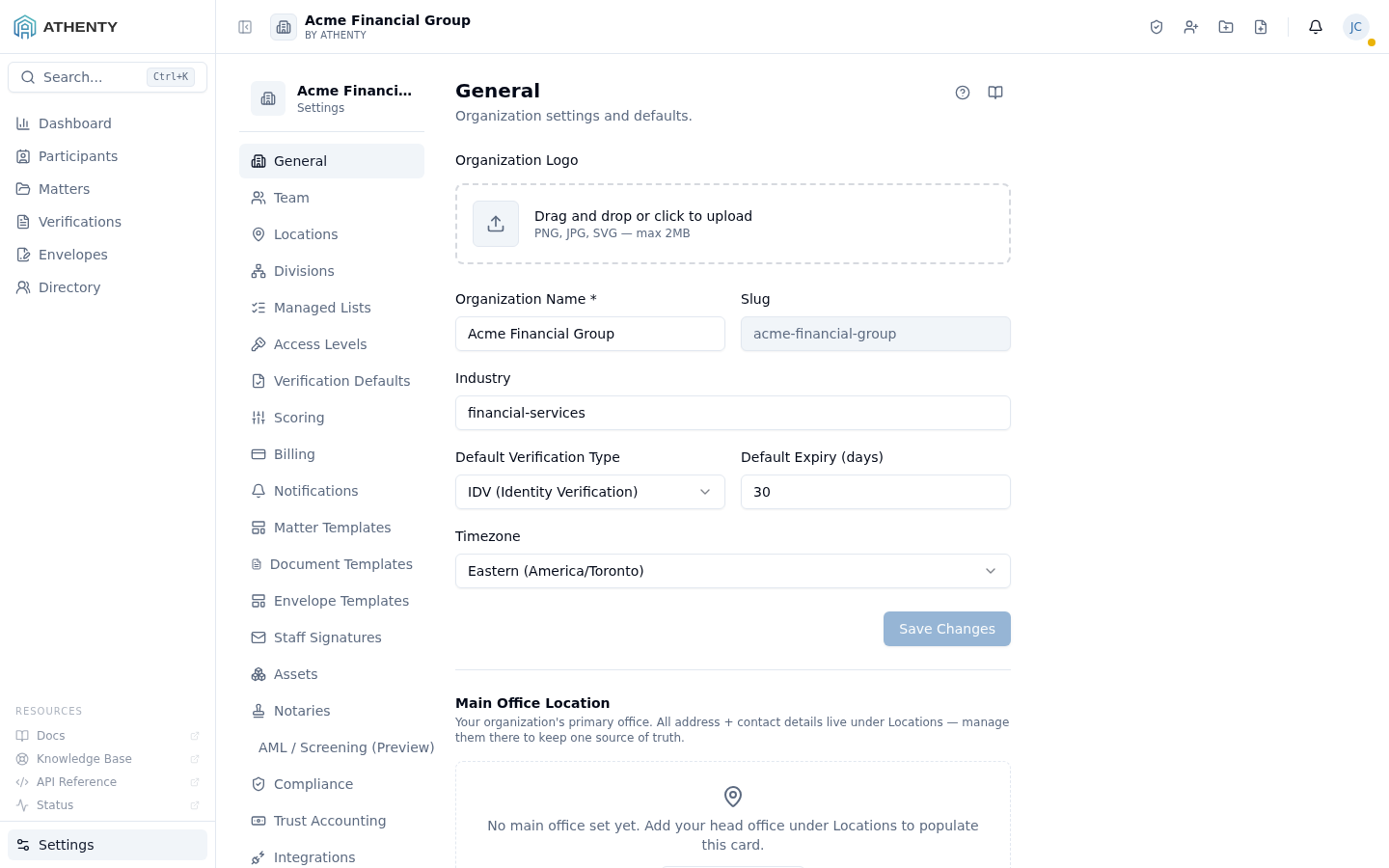
Anatomy of the page
Section titled “Anatomy of the page”1. Page header
Section titled “1. Page header”Standard PageHeader with the title General and a one-line description. Lives inside the broader Settings layout — the sub-nav on the left lists every settings sub-page (Organization, Team, Billing, …); this page is the first entry under the General group.
2. Long single-column form
Section titled “2. Long single-column form”Unlike the Account pages, this is one continuous form with section sub-headings rather than tabs. Sections in order:
| Section | Purpose |
|---|---|
| Organization Logo | Upload + preview; appears in emails, audit PDFs, signatures |
| General | Name, industry, default verification type, expiry days, timezone |
| HQ Location | Picker bound to Settings ▸ Locations |
| Accounting Contact | Name, email, phone for billing surfaces |
| Support / Admin Contact | Name, email, phone for client-facing surfaces |
| Document Sharing | Third-party recipient policy, default expiry, watermark |
| Client Portal | Toggle + subdomain configuration |
3. Save / unsaved-changes guard
Section titled “3. Save / unsaved-changes guard”The form uses react-hook-form with zodResolver and a useUnsavedChanges
guard. Navigating away with dirty fields prompts a confirm dialog.
Logo upload
Section titled “Logo upload”The drop zone accepts:
- PNG, JPG, SVG (preferred PNG with transparent background)
- Max 5 MB
- Drag-and-drop or click-to-browse
On upload, the file is sent to POST /org/logo and the response URL is
stored on the org record. The preview swaps instantly; the persisted URL
lands on Save.
General fields
Section titled “General fields”| Field | Type | Notes |
|---|---|---|
| Name | text | Required; min 1 |
| Industry | text | Optional |
| Default verification type | enum | idv or kyc |
| Default expiry days | int | 1–365; default 30 |
| Timezone | string | IANA timezone, e.g., America/Toronto |
These flow into:
- The pre-selected verification type when a user clicks New Verification
- The default expiry timestamp on every verification and envelope
- The timezone used when rendering activity-feed timestamps and audit PDFs
HQ location
Section titled “HQ location”The HQ field is a picker, not a free-form input. It binds to a record in Settings ▸ Locations so:
- The HQ pin on Directory ▸ Map has a real lat/lng to plot
- Audit PDFs render the HQ address consistently
- The picker only shows non-archived locations
If no location exists, a CTA links to Settings ▸ Locations to create one inline.
Contacts
Section titled “Contacts”Two free-form contact blocks that pipe into different surfaces:
| Block | Used by |
|---|---|
| Accounting Contact | Stripe receipts, invoice footers, billing notifications |
| Support / Admin Contact | Invite emails, client portal “Need help?” link |
Each has name, email, and phone. We recommend role-based aliases
(billing@firm.com, support@firm.com) over individual addresses for
continuity.
Document sharing defaults
Section titled “Document sharing defaults”A handful of fields:
- Allow third-party recipients — global toggle; off = no envelope can include external recipients
- Default sharing expiry — TTL for shared verification links
- Watermark text — overlay on every shared PDF (off if blank)
These are defaults; per-envelope and per-verification settings can override.
Client portal
Section titled “Client portal”A toggle that exposes a self-serve portal at
<your-tenant>.athenty.com. When enabled:
- Subdomain provisioning is automatic via Cloudflare
- The portal mirrors verification + envelope status to the client side
- Clients can update their contact info (suggest-edit on their own Athenty record)
When disabled, the subdomain serves a 404 and clients receive only direct invite emails.
Permissions and scope
Section titled “Permissions and scope”| Role | View | Edit |
|---|---|---|
| Owner / Admin | ✓ | ✓ |
| Member | Indirect (sees side effects) | ✗ |
| Viewer | ✗ | ✗ |
The whole /settings/* tree is admin-only via RoleGuard. Members
hitting these URLs get a 403 page.
Audit logging
Section titled “Audit logging”Every save emits org.settings_updated with the diff. The event surfaces
in Settings ▸ Audit Log and is one of the most useful events to
monitor for compliance review.
Troubleshooting
Section titled “Troubleshooting”| Symptom | Most likely cause | Fix |
|---|---|---|
| Logo broken | File too large or unsupported type | Use PNG/JPG/SVG under 5 MB |
| HQ pin missing on Map | No HQ chosen, or the location is archived | Pick a non-archived location |
| Stripe receipts to wrong email | Accounting contact stale | Update Accounting Contact |
| Client portal returns 404 | Toggle off or subdomain not provisioned | Enable, wait ~5 min for DNS, retry |
| Wrong timezone on activity feed | Org timezone misconfigured | Update under General |
Related pages
Section titled “Related pages”- Settings ▸ Locations — populates the HQ picker
- Settings ▸ Verification Defaults — verification-specific overrides
- Settings ▸ Billing — Stripe-facing billing surface
- Settings ▸ Audit Log —
org.settings_updatedevents