
Settings — Billing
The Settings ▸ Billing page is the admin surface for everything financial about your tenant: current subscription, this-period usage, payment methods on file, downloadable invoices, tax/billing address, and the self-serve cancel button.
The page is split by role: Owners see and edit everything; Admins see usage and invoices but cannot change the plan or payment methods.
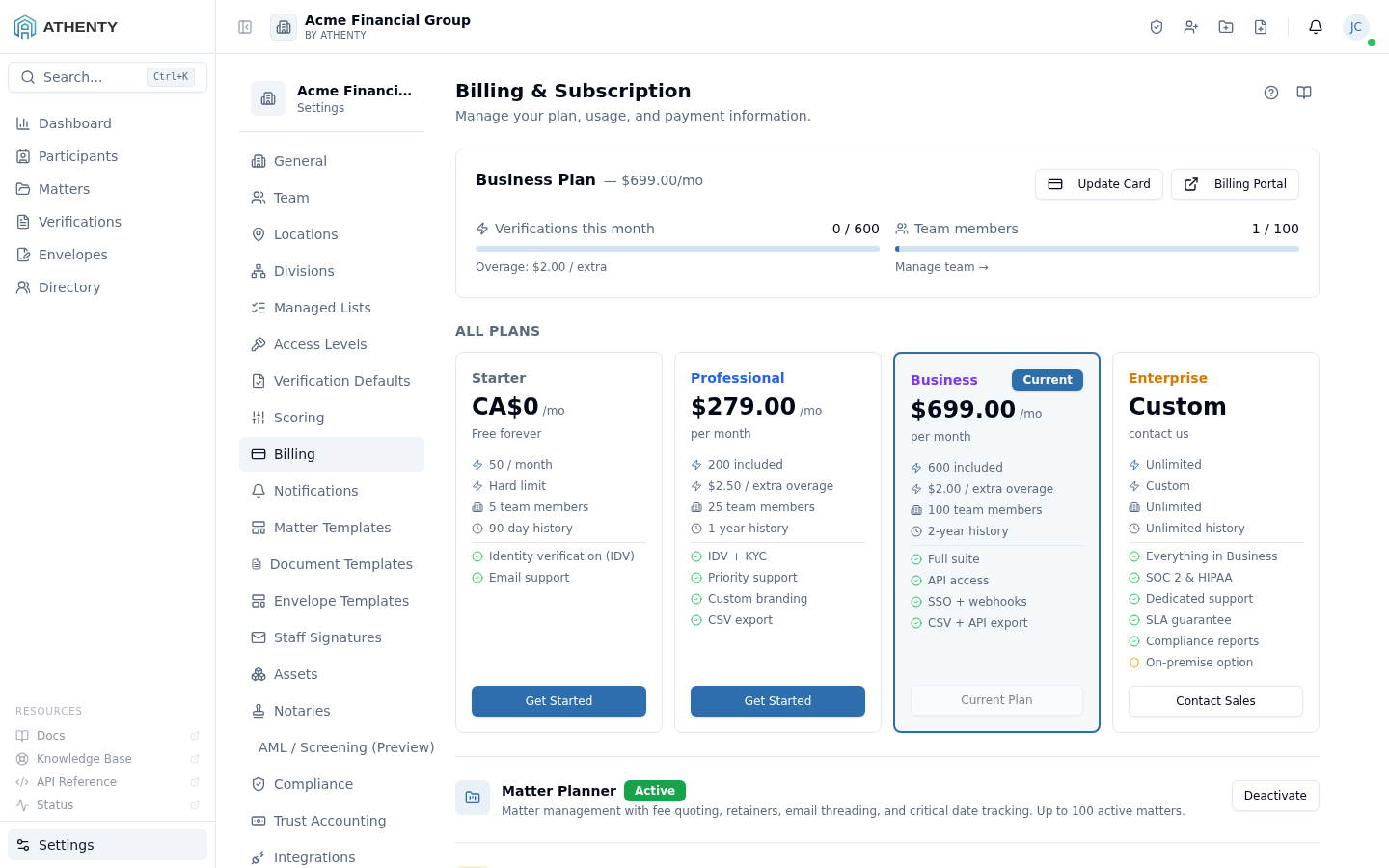
Anatomy of the page
Section titled “Anatomy of the page”1. Page header
Section titled “1. Page header”PageHeader with the title Billing & Subscription and a one-line description.
2. Plan summary card
Section titled “2. Plan summary card”Shows current plan, billing cadence (monthly / annual), next renewal date, and included quotas. Clicking the plan name opens a plan-comparison modal.
3. Usage cards
Section titled “3. Usage cards”Three live tallies:
- Verifications consumed
- Envelopes sent
- Paid lookups (PEP/HIO, biometric) consumed
A red banner overlays when usage exceeds 90% of the included quota.
4. Upgrade section
Section titled “4. Upgrade section”Plan tier comparison grid. Each tier card has a checkmark feature list and an Upgrade button. Clicking the button kicks off a Stripe Checkout session.
5. Payment methods
Section titled “5. Payment methods”Stripe Elements–backed card list. Add, remove, set default. Card data never touches Athenty’s servers.
6. Invoices
Section titled “6. Invoices”A simple table of past invoices. Each row has a Download PDF action that streams the Stripe-generated PDF.
7. Tax & billing address
Section titled “7. Tax & billing address”Editable address block synced to the Stripe customer record.
8. Cancel subscription (Owner-only)
Section titled “8. Cancel subscription (Owner-only)”A destructive button at the bottom. Cancellation schedules termination at the end of the current billing period; data is preserved across cancellation.
Stripe integration
Section titled “Stripe integration”The billing surface is Stripe-backed end to end:
- Subscriptions use Stripe Subscriptions
- Invoices are Stripe-generated and downloaded via signed URL
- Payment methods use Stripe Elements; PCI scope stays at Stripe
- Tax uses Stripe Tax for jurisdiction calculation
- Webhooks at the platform receive Stripe events for subscription lifecycle and invoice paid/failed
Plan changes happen via Stripe Checkout (hosted) for upgrades. The
Stripe webhook receives the checkout.session.completed event and
updates the tenant’s plan record on the platform side.
Plan-tier capabilities
Section titled “Plan-tier capabilities”Plan tier gates several features across the platform:
| Feature | Min tier |
|---|---|
| AML screening | Professional |
| KYC verifications | Professional |
| Per-step paid lookups (PEP/HIO) | Professional |
| API keys | Professional |
| Bulk envelope send | Business |
| Custom verification steps | Enterprise |
| Trust accounting + retention purges | Business |
Tier checks happen server-side; downgrading from a higher tier turns off the gated features but does not delete data.
Permissions and scope
Section titled “Permissions and scope”| Role | View | Upgrade | Payment methods | Invoices | Cancel |
|---|---|---|---|---|---|
| Owner | ✓ | ✓ | ✓ | ✓ | ✓ |
| Admin | ✓ | ✗ | ✗ | ✓ | ✗ |
| Member | ✗ | ✗ | ✗ | ✗ | ✗ |
| Viewer | ✗ | ✗ | ✗ | ✗ | ✗ |
Audit logging
Section titled “Audit logging”| Action | Event |
|---|---|
| Upgrade | billing.plan_upgraded (with old + new tier) |
| Downgrade | billing.plan_downgraded |
| Add card | billing.payment_method_added |
| Remove card | billing.payment_method_removed |
| Cancel | billing.subscription_canceled |
| Re-subscribe | billing.subscription_resumed |
Events surface in Settings ▸ Audit Log.
Troubleshooting
Section titled “Troubleshooting”| Symptom | Most likely cause | Fix |
|---|---|---|
| Upgrade button hidden | Role is Admin | Owner must initiate |
| Stripe Checkout fails | Card declined / 3DS challenge | Try another card |
| Usage banner red | Quota exceeded | Upgrade or wait for next period |
| Cancel hidden | Role is Admin | Owner must cancel |
| Plan change not reflecting | Webhook delayed | Wait ~30s; refresh |
| Invoice download 403 | Stale signed URL | Re-fetch invoice list and retry |
Related pages
Section titled “Related pages”- Settings ▸ Organization — Accounting Contact for invoice automation
- Settings ▸ API Keys — gated by plan tier
- Settings ▸ Screening — gated by plan tier
- Settings ▸ Audit Log —
billing.*events