
Settings — Audit Log
The Settings ▸ Audit Log page is the canonical, append-only record of every action taken in your organization. The log is admin-only and forms the backbone of the platform’s compliance story — bar audits, regulator inquiries, security investigations, and incident post-mortems all start here.
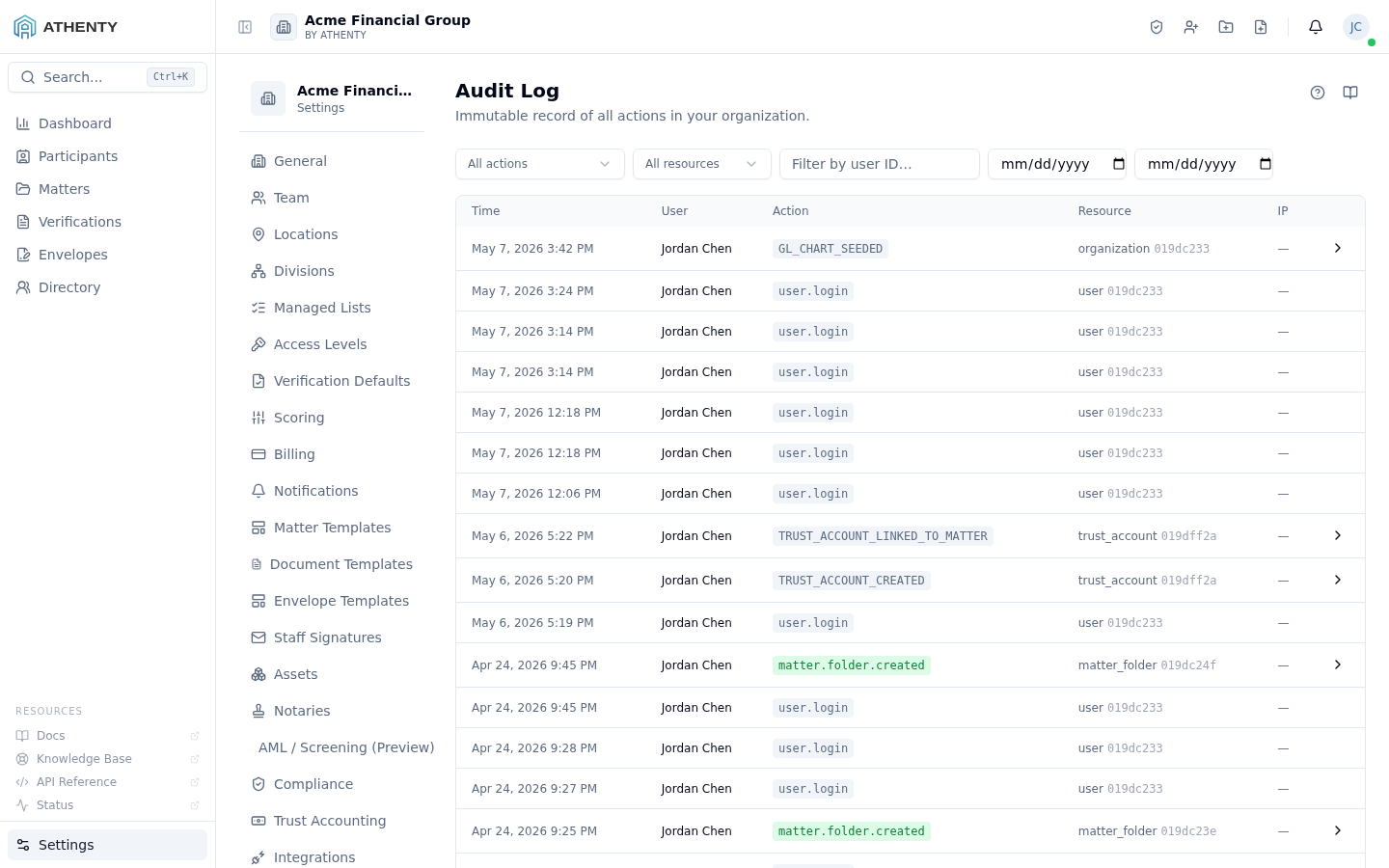
Anatomy of the page
Section titled “Anatomy of the page”1. Page header
Section titled “1. Page header”Standard PageHeader with the title Audit Log and a one-line description.
2. Filter row
Section titled “2. Filter row”Three filter controls above the table:
- Action — single-select dropdown of typed event names
- Actor — free-form search of user name or email
- Resource ID — UUID input to find every event on a specific record
Filters compose. The list re-fetches on every filter change with optimistic loading state.
3. Audit table
Section titled “3. Audit table”Each row shows:
- Actor — name + role badge
- Action — typed event name (e.g.,
matter.updated) - Resource — type + truncated ID with a tooltip for the full UUID
- When — relative + absolute timestamp
- Chevron — expands the row to reveal the full metadata payload
4. Pagination footer
Section titled “4. Pagination footer”50 rows per page server-side, with prev/next and a direct page-number input.
Event taxonomy
Section titled “Event taxonomy”The platform emits typed events under a <domain>.<action> schema:
| Domain | Common actions |
|---|---|
client.* | created, updated, deleted |
matter.* | created, updated, deleted, hold_applied, hold_released |
request.* | created, approved, rejected, canceled, reopened, shared |
user.* | invited, updated, role_updated, deactivated |
org.* | settings_updated, scoring_weights_updated, aml_settings_updated, compliance_settings_updated |
trust.* | account_created, account_closed, reconciliation_completed, purge_requested, purge_approved, purge_declined |
auth.* | password_changed, 2fa_enabled, 2fa_disabled, session_revoked |
notary.* | application_submitted, application_approved, suspended, reinstated |
The full taxonomy lives in packages/api/src/audit/events.ts and
expands as new features ship.
Event shape
Section titled “Event shape”Each event row is a typed JSON document:
{ "id": "01jdc233-4dae-7776-...", "actor_user_id": "01jdc234-...", "actor_name": "Jordan Chen", "actor_role": "owner", "action": "matter.updated", "resource_type": "matter", "resource_id": "01jdc235-...", "metadata": { "diff": { "status": ["open", "closed"] } }, "ip_address": "203.0.113.42", "user_agent": "Mozilla/5.0 (...)", "created_at": "2026-05-07T20:15:00.000Z"}Update events include a diff in metadata as { field: [old, new] }.
Create and delete events include the full pre/post snapshot.
Filter mechanics
Section titled “Filter mechanics”The action filter is exact-match on the event name. To match a domain
broadly (e.g., every matter.* event), use the wildcard pattern in the
URL:
/settings/audit-log?action=matter.*The Actor filter is a fuzzy search across users.name_first + name_last and users.email. The Resource ID filter is exact UUID
match.
Pagination
Section titled “Pagination”The cursor is keyset on id, so deep pages are fast for filtered
queries but slow for unfiltered ones. The page footer surfaces the
total count from the pagination.total field — for large tenants this
adds a brief query latency, so prefer filtering before paginating.
Retention
Section titled “Retention”Audit log retention follows the org’s Settings ▸ Retention Policy setting. Default is 10 years. Audit events are never purged via the trust two-admin workflow — they age out via the global retention window strictly.
The retention worker runs nightly at 02:30 UTC and emits
audit.events_purged for each purge batch.
Permissions and scope
Section titled “Permissions and scope”| Role | View | Filter | Export |
|---|---|---|---|
| Owner / Admin | ✓ | ✓ | ✓ |
| Member | ✗ (sees own under Account ▸ Profile ▸ Activity) | n/a | ✗ |
| Viewer | ✗ | n/a | ✗ |
/settings/* is admin-only via RoleGuard. The user-scoped Activity
feed is served by a separate GET /audit-log/me endpoint that filters
to actor_user_id = current_user_id.
Export
Section titled “Export”The page supports CSV export of the currently filtered set. Exports include:
- All visible columns
- The full
metadatapayload as a JSON column - Pagination flattened into one CSV regardless of page count
For large exports (>10,000 rows) the server queues the export and emails the user a download link.
Troubleshooting
Section titled “Troubleshooting”| Symptom | Most likely cause | Fix |
|---|---|---|
| Empty list | Filters too narrow | Loosen action filter; widen date range |
| Slow pagination | Deep page on unfiltered set | Add a filter; cursor is keyset on id |
| Cannot find an expected event | Filter mismatch on action name | Try wildcard or domain-prefix |
| Export blocks | Server queued for large export | Wait for the email link |
| Event missing entirely | Pre-dates the audit subsystem | Some legacy actions (pre-2025) were not logged |
Related pages
Section titled “Related pages”- Account ▸ Profile ▸ Activity — user-scoped view of own events
- Settings ▸ Retention Policy — retention policy that gates audit purges
- Settings ▸ Regulator Reports — the trust reports a regulator asks for