
Settings — Scoring Weights
The Settings ▸ Scoring page controls the deduction weights that drive the document score Athenty computes for every verification. Each document starts at 100, and weights configured here are deducted when the matching engine flags a mismatch.
The score is informational — it surfaces in reviewer-facing UI to help triage, but never auto-approves or auto-rejects. Final decisions are always human-made.
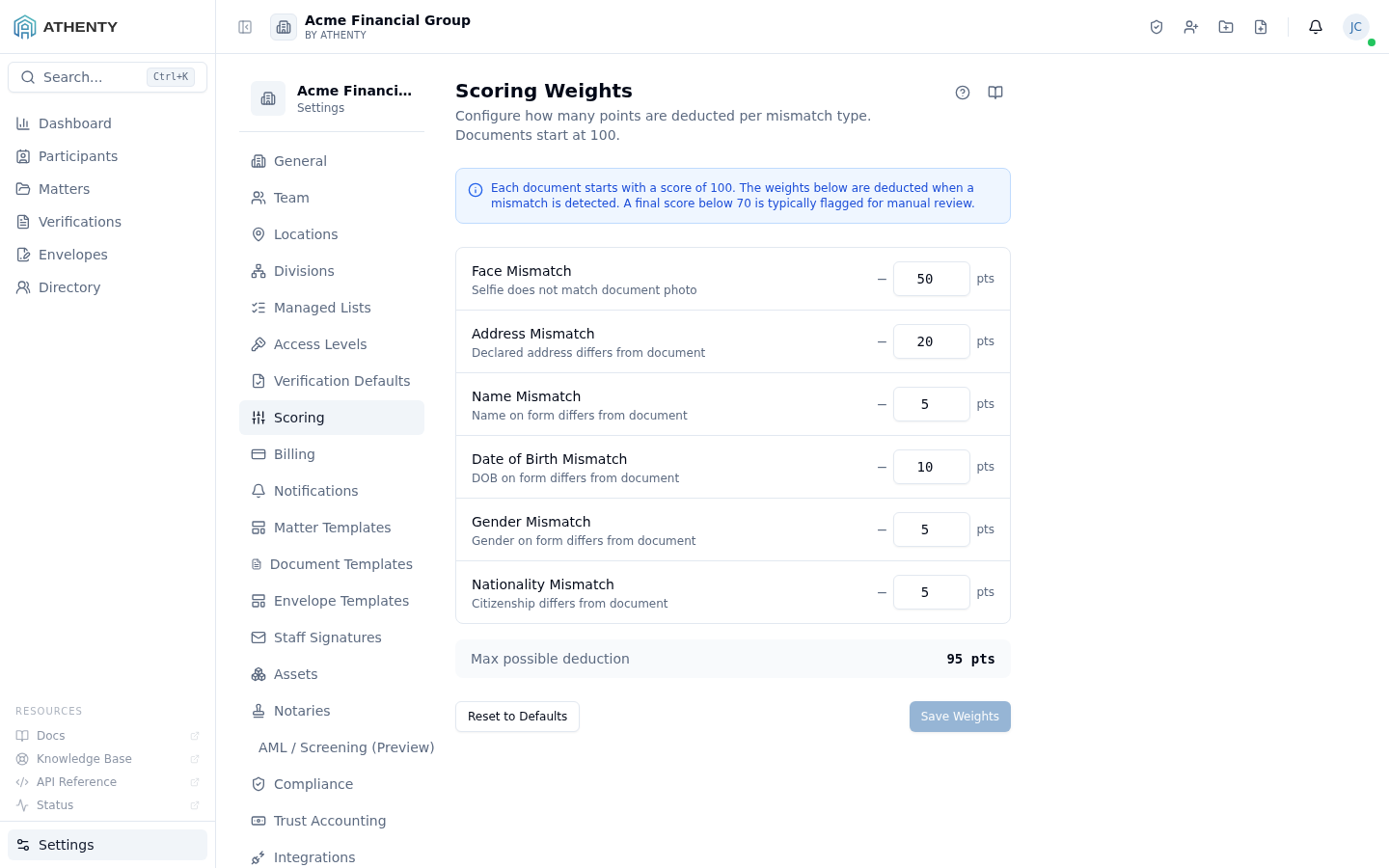
Anatomy of the page
Section titled “Anatomy of the page”1. Page header
Section titled “1. Page header”Standard PageHeader with the title Scoring Weights and a one-line description.
2. Info banner
Section titled “2. Info banner”A blue info banner reinforces the model: “Each document starts with a score of 100. The weights below are deducted when a mismatch is detected.”
3. Weight form
Section titled “3. Weight form”Six numeric inputs, each labeled and described:
| Field | Description |
|---|---|
| Face Mismatch | Selfie does not match document photo |
| Address Mismatch | Declared address differs from document |
| Name Mismatch | Name on form differs from document |
| Date of Birth Mismatch | DOB on form differs from document |
| Gender Mismatch | Gender on form differs from document |
| Nationality Mismatch | Citizenship differs from document |
Each input is constrained to integers 0–100 by the Zod schema.
4. Live preview
Section titled “4. Live preview”A footer card shows the score that would be assigned if every weighted mismatch fired on a single document — useful for sanity-checking that your weight set produces a meaningful range.
5. Action row
Section titled “5. Action row”- Reset to defaults — restores the seeded weights (face 50, name 25, DOB 25, address 10, gender 5, nationality 5)
- Save changes — persists the form via the
useUpdateScoringWeightshook
Default weights
Section titled “Default weights”The seed defaults emphasize identity attributes over soft attributes:
| Mismatch | Weight |
|---|---|
| Face | 50 |
| Name | 25 |
| DOB | 25 |
| Address | 10 |
| Gender | 5 |
| Nationality | 5 |
Sum = 120. A document with every mismatch fires would score
100 − 120 = -20, clipped to 0 in the UI.
Where the score appears
Section titled “Where the score appears”- The verification detail page renders the document score next to the document preview
- The dashboard’s Approval rate and Funnel charts can be filtered by score bucket
- Reviewer queue prioritization sorts by ascending score by default
Schema and validation
Section titled “Schema and validation”const schema = z.object({ faceMismatch: z.number().int().min(0).max(100), addressMismatch: z.number().int().min(0).max(100), nameMismatch: z.number().int().min(0).max(100), dobMismatch: z.number().int().min(0).max(100), genderMismatch: z.number().int().min(0).max(100), nationalityMismatch: z.number().int().min(0).max(100),})Validation runs on the form before submission; values outside the 0–100 integer range surface inline errors.
When to adjust
Section titled “When to adjust”- After 2–4 weeks of real verifications, review the score distribution in Settings ▸ Compliance ▸ Scoring analytics
- If a mismatch type is consistently a false alarm in your industry, reduce its weight
- If a mismatch type is consistently the deciding factor in rejections, raise its weight to better reflect reviewer behaviour
Permissions and scope
Section titled “Permissions and scope”| Role | View | Edit |
|---|---|---|
| Owner / Admin | ✓ | ✓ |
| Member | Indirect (sees scores on verification detail) | ✗ |
| Viewer | ✗ | ✗ |
Weights are tenant-wide. There is no per-matter or per-template override.
Audit logging
Section titled “Audit logging”Every save emits org.scoring_weights_updated with the diff between the
prior and new weight set. The event surfaces in
Settings ▸ Audit Log.
Troubleshooting
Section titled “Troubleshooting”| Symptom | Most likely cause | Fix |
|---|---|---|
| Save fails | Value outside 0–100 integer range | Adjust to a valid value |
| Score never moves below 100 | All weights are zero | Restore defaults or pick non-zero values |
| Score goes negative | Sum of weights exceeds 100 | Reduce one or more weights |
| Reviewers complain about noisy scores | Soft-attribute weights too high | Lower address / gender / nationality |
| Reset to defaults disabled | Form already matches defaults | Adjust a value to enable |
Related pages
Section titled “Related pages”- Settings ▸ Compliance — score-bucket analytics dashboard
- Settings ▸ Audit Log —
org.scoring_weights_updatedevents - Verifications — the surface where scores appear