
Settings — Trust Accounting
The Settings ▸ Trust Accounting page is the admin surface for managing IOLTA trust accounts, monthly bank reconciliations, retention policy, and the manual two-admin purge workflow.
The single most important thing about this page: the platform never auto-purges. Every retention purge is an explicit two-admin decision captured in the audit log. This is by design to satisfy provincial bar expectations around evidence preservation and intentional destruction.
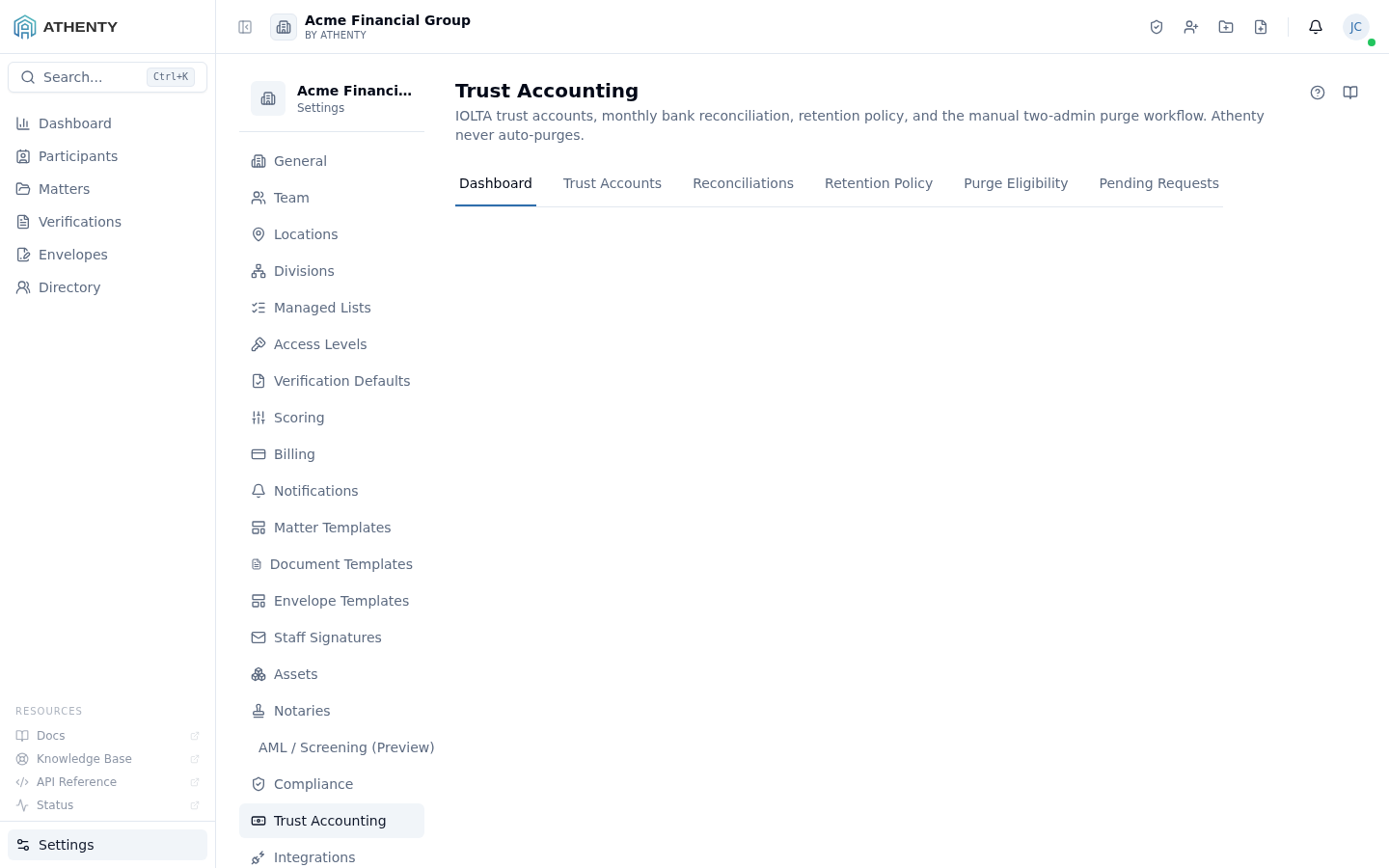
Anatomy of the page
Section titled “Anatomy of the page”1. Page header
Section titled “1. Page header”Standard PageHeader with the title Trust Accounting and a multi-line description that emphasizes the never-auto-purge guarantee.
2. Six-tab layout
Section titled “2. Six-tab layout”The page composes five independent surfaces under one Tabs container. Retention policy used to be a sixth tab here; it now has its own page at Settings ▸ Retention Policy.
| Tab | Contents |
|---|---|
| Dashboard | Trust balances, last recon dates, pending purge counts |
| Trust Accounts | CRUD on IOLTA account records + bank linkage |
| Reconciliations | Monthly bank-vs-ledger-vs-liability recon list |
| Purge Eligibility | Records past the retention window |
| Pending Requests | Two-admin purge request queue |
Tabs persist in the URL via the standard Tabs component pattern.
Trust accounts
Section titled “Trust accounts”Each row captures:
- Display name
- Bank (selected from a jurisdiction-approved list)
- Masked account number
- Currency (CAD / USD typical)
- Status (Active / Closed)
- Last reconciled timestamp
The Add Account button opens an inline form. Edits and closures happen from the row menu.
Cheque printing
Section titled “Cheque printing”Each bank account carries its own cheque-printing setup, used when you print a cheque for a trust payment. Most firms print onto pre-printed stock — the bank/supplier pre-prints the borders, field titles, MICR line and the cheque number, and Athenty lays down only the variable data (date, payee, amounts, memo). This mirrors industry-standard accounting software.
Pre-printed stock design. Pick the design that matches your physical cheque stock and the print layout follows it automatically — the same model the standard stock catalogue uses. Equivalents to the common Deluxe Canadian designs are built in:
| Stock design | Layout |
|---|---|
| Stub · Cheque · Stub | Cheque with a stub on each side |
| Cheque · Cheque · Cheque | Three cheques per page |
| Cheque · Stub · Stub | Cheque on top, two voucher stubs below |
| Stub · Stub · Cheque | Two voucher stubs, cheque on the bottom |
| Deluxe HSL9037 (Canada) | Stub / Cheque / Stub |
| Deluxe HS9209 (Canada) | Cheque / Stub / Stub |
Choose Custom to drive the layout yourself instead of from a design. The chosen design is the account default; the accounting manager can override it per cheque in the Print cheque dialog.
Alignment. If your printer lands the data slightly outside the pre-printed boxes, nudge it with the per-account Align X / Align Y offsets (millimetres; +X right, +Y down). Always print at actual size (100%, “fit to page” off).
Cheque numbering — automatic but editable. Athenty assigns the next
cheque number automatically from the account’s sequence. You can edit the
Next cheque number to sync with a fresh pad of pre-printed stock. When
you change it, Athenty asks you to confirm a sequence reset — confirm
to continue numbering from the new value (recorded in the audit trail as a
CHEQUE_SEQUENCE_RESET), or keep the current sequence to discard the
edit. If a printed cheque misfires, mark the physical cheque VOID and use
Misprint — void & use next number in the Print cheque dialog: the old
number is permanently consumed and the cheque claims the next one.
Reconciliation model
Section titled “Reconciliation model”A clean monthly recon ties three numbers:
bank statement balance == ledger debits − credits == Σ per-client liabilitiesWhen all three match, the recon status is Reconciled. Any drift flips it to Discrepant, and the recon detail page surfaces a per-line-item breakdown to identify the source.
Retention policy
Section titled “Retention policy”Retention policy now lives on its own page — Settings ▸ Retention Policy — and is documented there in full. In short:
| Policy | Window |
|---|---|
| 6 years | 6 years from matter close |
| 7 years | 7 years from matter close |
| 10 years | 10 years from matter close (default) |
| Permanent hold | Never expires |
A change to the policy affects future eligibility — already-eligible
records remain eligible until purged or placed on permanent hold. Each
save emits org.trust_retention_updated to the audit log.
Purge eligibility
Section titled “Purge eligibility”Records become eligible for purge <retention-window> after the matter
closes. Eligibility surfacing is informational — nothing happens
automatically. The Eligibility tab lists every eligible record with a
Request purge button.
Two-admin purge workflow
Section titled “Two-admin purge workflow”The deliberate two-admin gate:
- Admin A clicks Request purge on an eligible record
- A request lands in the Pending Requests tab
- Admin B (different
user_id) reviews and either approves or declines - On approve:
- Trust ledger entries are cryptographically destroyed
- The audit event captures both
requested_byandapproved_by
- On decline:
- The request is closed with the decline reason
- The record remains in the Eligibility queue
The same-admin guard is enforced server-side. Attempting to approve
your own request returns a 403 with error: "self_approval_forbidden".
Permissions and scope
Section titled “Permissions and scope”| Role | View | Configure | Request purge | Approve purge |
|---|---|---|---|---|
| Owner | ✓ | ✓ | ✓ | ✓ |
| Admin | ✓ | ✓ | ✓ | ✓ (different admin from requester) |
| Member | ✗ | ✗ | ✗ | ✗ |
| Viewer | ✗ | ✗ | ✗ | ✗ |
Audit logging
Section titled “Audit logging”Every action emits an audit event:
org.trust_retention_updated— policy change with difftrust.account_created/trust.account_closedtrust.reconciliation_completed/trust.reconciliation_discrepanttrust.purge_requested(with requester ID)trust.purge_approved(with both requester and approver IDs)trust.purge_declined(with decliner ID + reason)
Events surface in Settings ▸ Audit Log. Trust events are particularly important — exporting them is the easiest way to satisfy a bar audit’s evidence ask.
Troubleshooting
Section titled “Troubleshooting”| Symptom | Most likely cause | Fix |
|---|---|---|
| Recon flagged Discrepant | Three balances diverge | Open detail; per-tab breakdown identifies the source |
| Cannot approve purge | You requested it | Different admin must approve |
| Record stays Eligible after purge | Cache stale | Refresh the tab |
| Permanent hold setting reverts | Save failed | Re-save; check toast for cause |
| Purge request reappears after decline | Was re-submitted | Re-evaluate or decline with a clearer reason |
Related pages
Section titled “Related pages”- Settings ▸ Retention Policy — the retention window and the two-admin purge workflow
- Settings ▸ Matters ▸ Document Hold — holds that suppress purge eligibility
- Settings ▸ Audit Log —
trust.*events - Matters — closing a matter starts the retention clock